EducationSoftwareStrategy.com
StrategyCommunity

Knowledge Base

Product

Community

Knowledge Base

TopicsBrowse ArticlesDeveloper Zone

Product

Download SoftwareProduct DocumentationSecurity Hub

Education

Tutorial VideosSolution GalleryEducation courses

Community

GuidelinesGrandmastersEvents
x_social-icon_white.svglinkedin_social-icon_white.svg
Strategy logoCommunity

© Strategy Inc. All Rights Reserved.

LegalTerms of UsePrivacy Policy
  1. Home
  2. Topics

KB326950: The Everyone group is automatically added to the ACL of newly created schema objects in Developer


Xiaoqing Du

Quality Engineer, Senior • MicroStrategy


The behavior in Developer that is described in this document is by design. The Everyone group is automatically added to the ACL of newly created schema objects, even if the Everyone group is not part of the ACL of the parent folder object.

Steps to reproduce in Developer

  • Consider a folder with the following ACL that does not include the Everyone group.
ka04W000000uGfeQAE_0EM440000002UoO.jpeg
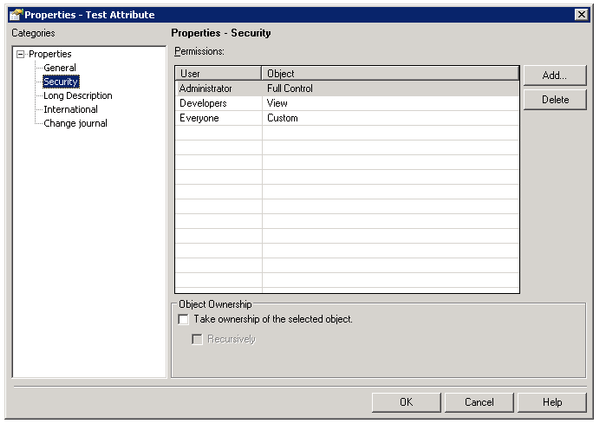
  • Create a schema object, such as an attribute or fact, inside this folder.
ka04W000000uGfeQAE_0EM440000002UoQ.jpeg
  • Note that in addition to the ACL inherited from the parent folder object, the Everyone group is also granted custom access.  This custom access grants Browse and Read permissions to the Everyone group.


Cause

This behavior in Developer is by design. The Everyone group is automatically granted Browse and Read access to newly created schema objects.
Please note that this behavior is different in Workstation. When creating new schema objects in Workstation, the Everyone user group is not added to the ACL of the schema objects.
 

Workaround

If you do not want the Everyone group in the ACL, you can manually modify the ACL of the schema object and remove the Everyone group.


Comment

0 comments

Details

Knowledge Article

Published:

July 14, 2017

Last Updated:

October 10, 2023