EducationSoftwareStrategy.com
StrategyCommunity

Knowledge Base

Product

Community

Knowledge Base

TopicsBrowse ArticlesDeveloper Zone

Product

Download SoftwareProduct DocumentationSecurity Hub

Education

Tutorial VideosSolution GalleryEducation courses

Community

GuidelinesGrandmastersEvents
x_social-icon_white.svglinkedin_social-icon_white.svg
Strategy logoCommunity

© Strategy Inc. All Rights Reserved.

LegalTerms of UsePrivacy Policy
  1. Home
  2. Topics

KB32714: How to move some labels in Pie Chart outside the slices while keeping the rest inside the graph area in MicroStrategy Developer 9.x


Stefan Zepeda

Salesforce Solutions Architect • Strategy


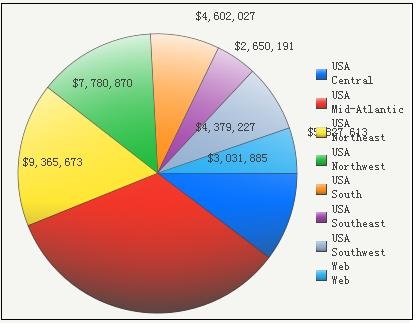
Under some circumstances, users might want to display some Pie Chart labels outside of the graph area while keeping the rest inside the slices. By default the  Graph Options > Data Labels options only allows to have all values either inside or outside the graph 'Values on Slices'  as shown below:
 

ka02R000000kbsNQAQ_0EM440000002E8x.jpeg

 
Follow below steps to move value labels manually:
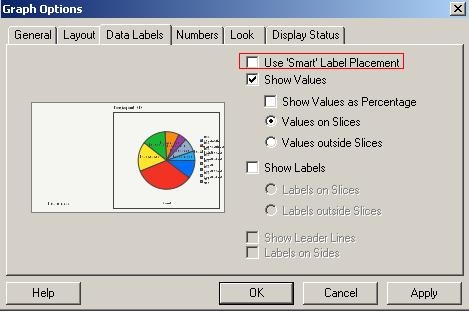
 

  1. Run the Pie Chart report, in Graph Options > Data Labels, uncheck the option 'Use smart label placement', as shown below:
ka02R000000kbsNQAQ_0EM440000002E8z.jpeg


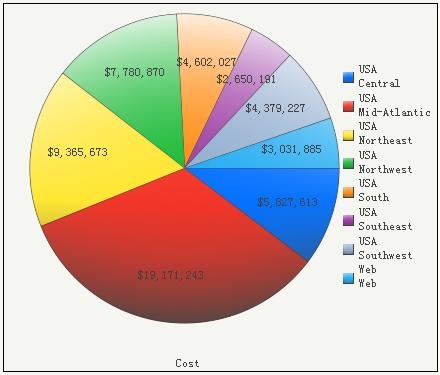
  • Users will now be able to move the labels inside and outside of the pie chart manually as shown in the image below:
ka02R000000kbsNQAQ_0EM440000002E8w.jpeg


Comment

0 comments

Details

Knowledge Article

Published:

June 7, 2017

Last Updated:

June 7, 2017