Using Strategy Web 10.x, after navigating between 3 different projects, users are prompted to provide login credentials while having a valid session as soon as the user attempts to run a report or Report Services document.
1. In this environment, three projects are available for users:

2. The user logs into each project sequentially
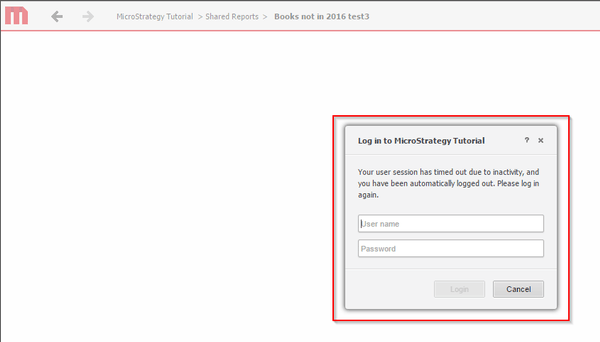
3. In the third project, running a document will result in a login prompt being shown:
CAUSE
This issue is caused by the Intelligence Server session cookie that is optionally enabled on the Web Administration page. When the session cookie is enabled, the Intelligence Server project session is stored locally on the client machine in a browser cookie. The project session information per project is approximately 2kb in size.
Web browsers limit the maximum size of a cookie to 4kb for performance reasons. This limit is hardcoded and cannot be altered. That means that a maximum of 2 project sessions can be stored in the Intelligence Server session cookie. As soon as the third project is accessed and a document is executed, the project session information is not found in the cookie and the user is prompted for login credentials.
ACTION
Disable the session cookie on the Web Administration page > Security > Cookies Security Level > "Store Strategy Intelligence Serversession information in temporary cookies instead of on the Web Server"
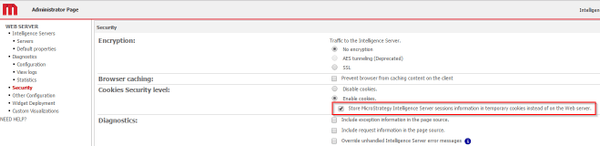
For security reasons, it is recommended to keep the setting "Store Strategy Intelligence Server session information in temporary cookies instead of on the Web Server" disabled. Session information stored on the client machine is vulnerable to session hijacking.
Strategy has no plans to address this issue other than recommending to disable the session cookie. For further questions, contact Strategy Technical Support.
Starting in Strategy 2020, the setting is disabled by default.
KB001088
