EducationSoftwareStrategy.com
StrategyCommunity

Knowledge Base

Product

Community

Knowledge Base

TopicsBrowse ArticlesDeveloper Zone

Product

Download SoftwareProduct DocumentationSecurity Hub

Education

Tutorial VideosSolution GalleryEducation courses

Community

GuidelinesGrandmastersEvents
x_social-icon_white.svglinkedin_social-icon_white.svg
Strategy logoCommunity

© Strategy Inc. All Rights Reserved.

LegalTerms of UsePrivacy Policy
  1. Home
  2. Topics

KB327282: "0x80043041: Could not find project" error displayed when attempting to connect to project with non-English language settings using MicroStrategy Office 10.x


Community Admin

• Strategy


SYMPTOM
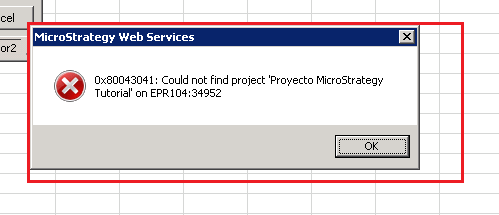
Projects that have a translated name cannot be accessed using Strategy Office 10.x and above. When attempting to access the project, the following error message is displayed:
ka04W000001Iv94QAC_0EM4400000025Mz.jpeg


0x80043041: Could not find project 'translated project name' on machinename:Port


STEPS TO REPRODUCE
1. Add a Spanish translation for Strategy Tutorial. To do so open Strategy Developer -> Strategy Tutorial -> Project configuration -> Project definition -> General -> click Modify button -> Properties -> International > click translate and insert translation
 

ka04W000001Iv94QAC_0EM4400000025Mm.jpeg

2. Set the metadata language for users to Spanish

ka04W000001Iv94QAC_0EM4400000025Mx.jpeg

 
3. Using Strategy Office, attempt to connect to the project and observe the error message

ka04W000001Iv94QAC_0EM4400000025Mv.jpeg


CAUSE
This is a known issue with Strategy Office 10.4.
 
ACTION
Contact Strategy Support for an update on this issue.


Comment

0 comments

Details

Knowledge Article

Published:

June 13, 2017

Last Updated:

June 13, 2017