EducationSoftwareStrategy.com
StrategyCommunity

Knowledge Base

Product

Community

Knowledge Base

TopicsBrowse ArticlesDeveloper Zone

Product

Download SoftwareProduct DocumentationSecurity Hub

Education

Tutorial VideosSolution GalleryEducation courses

Community

GuidelinesGrandmastersEvents
x_social-icon_white.svglinkedin_social-icon_white.svg
Strategy logoCommunity

© Strategy Inc. All Rights Reserved.

LegalTerms of UsePrivacy Policy
  1. Home
  2. Topics

KB327318: How to find the node key used to contruct URL API in MicroStrategy Web 10.x


Community Admin

• Strategy


This article outlines how to find the node key used to construct URL API in MicroStrategy Web.

In Strategy Web, when contruction URL API to fullfil various requirements, node key for selectors are always required.
KB38841 explained how to find node key in Strategy Version 9.x using <SPAN> element for standard selector. But the <SPAN> element is not used in Strategy Web 10.x in Presentation any more.
KB43570 explained how to find node key for grid selector in Strategy, but installation of 3rd party software is required.
This article explains how to find the node key in Strategy Web 10.x when running a Report Service document in Presentation mode by only searching the HTML page source.
 
Find node key for standard selector:
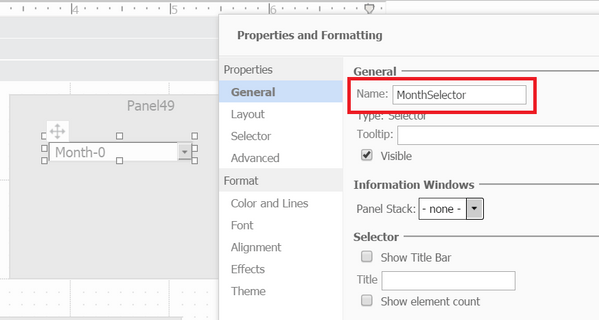
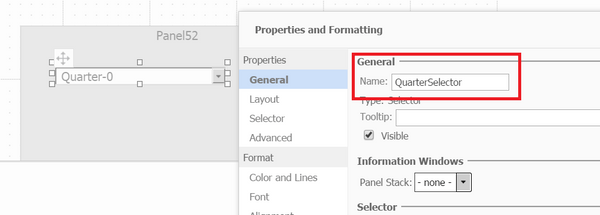
  • Right Mouse click your selector, choose "Properties and Formatting";
  • In General, record down the name of the selector, or rename the selector to something easy to identify. e.g. MonthSelector or QuarterSelector.
ka04W000000OcOQQA0_0EM4400000025M2.jpeg
ka04W000000OcOQQA0_0EM4400000025M5.jpeg
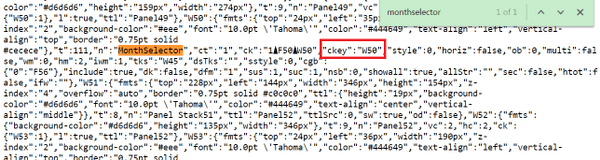
  • Run document in Presentation mode, use Chrome/IE/Firefox developer tool to inspect the page or view page source.
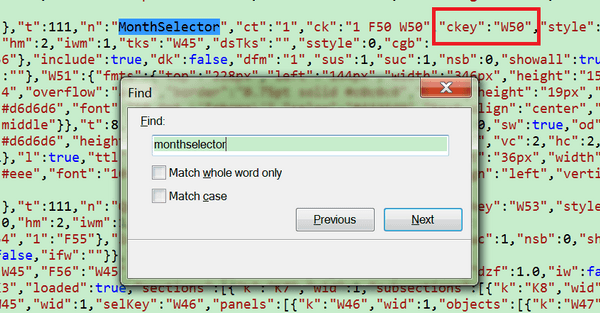
  • Search for the selector name, e.g "MonthSelector", right behide the selector name, there should be a pair of value ckey: xxx as shown below, the value is the node key can be used to contruct URL API. The node key for MonthSelector is W50.
    Sample in Chrome:
ka04W000000OcOQQA0_0EM4400000025M9.jpeg
  • Sample in IE:
ka04W000000OcOQQA0_0EM4400000025MA.jpeg

Find node key for standard selector: 
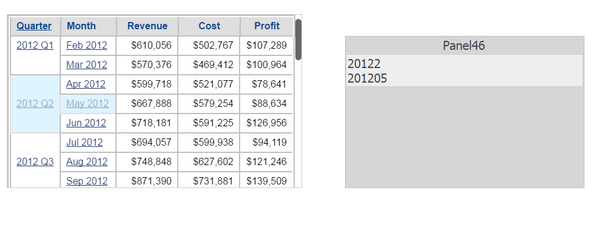
  • If you have 2 attributes in grid are used as selector, e.g. Quarter and Month, as shown below:
ka04W000000OcOQQA0_0EM4400000025M1.jpeg
  • Run document in Presentation mode, use Chrome/IE/Firefox developer tool to inspect the page or view page source.
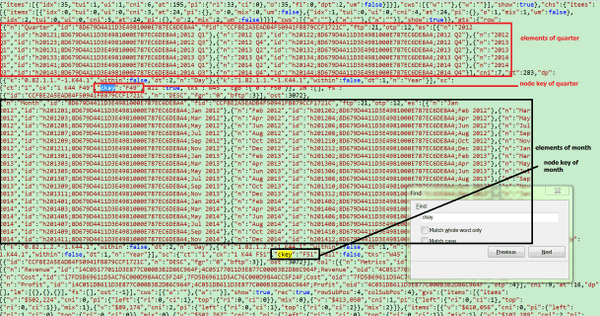
  • Search for "ckey", the value of "ckey" is the node key that could be used to contruct URL API.
  • To determine which ckey corresponding to which selector, check the content above ckey, the content should be the attribute elements for specific attribute, as shown in below example, the node key for Quarter selector is F49 and node key for Month selector is F51.
ka04W000000OcOQQA0_0EM4400000025M8.jpeg


Comment

0 comments

Details

Knowledge Article

Published:

June 12, 2017

Last Updated:

June 12, 2017