EducationSoftwareStrategy.com
StrategyCommunity

Knowledge Base

Product

Community

Knowledge Base

TopicsBrowse ArticlesDeveloper Zone

Product

Download SoftwareProduct DocumentationSecurity Hub

Education

Tutorial VideosSolution GalleryEducation courses

Community

GuidelinesGrandmastersEvents
x_social-icon_white.svglinkedin_social-icon_white.svg
Strategy logoCommunity

© Strategy Inc. All Rights Reserved.

LegalTerms of UsePrivacy Policy
  1. Home
  2. Topics

KB32749: MicroStrategy Intelligence Server and MicroStrategy Web components are not available for installation when trying to install MicroStrategy 9.x on a Windows 2003.


Community Admin

• Strategy


This KB addresses an issue seen when installing MicroStrategy 9.x on a Windows 2003 machine.

SYMPTOM:
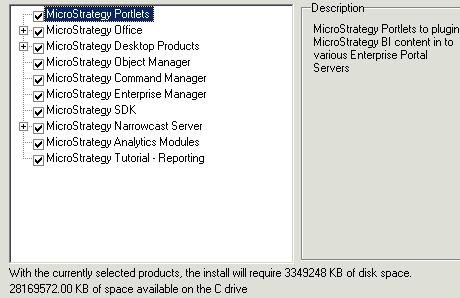
When trying to install Strategy Intelligence Server and Web 9.x  on Windows 2003 these two components are not visible  under the components to install even though the license key includes them.
ka04W000000Ohl4QAC_0EM440000002HSw.jpeg

 
CAUSE:
The license key used for installation is a 32-bit  license key while the server machine is 64-bit machine.
 
ACTION:
Verify that the Windows 2003 machine is a 32-bit or 64-bit installation. To check this, follow either one of these two methods below:
 
Method 1

  1. Click Start, click Run, type sysdm.cpl, and then click OK.
  2. Click the General tab. The operating system appears as follows:
  3. For a 64-bit version operating system: Microsoft Windows Server 2003 Enterprise x64 Edition appears under System.
  4. For a 32-bit version operating system: Microsoft Windows Server 2003 Enterprise Edition appears under System.

Method 2

  1. Go to Start -> Run and type winmsd.exe.  Click OK.
  2. In the details pane, locate Processor under Item. Note the value.
  3. If the value that corresponds to Processor starts with x86, the computer is running a 32-bit version of the Windows operating system.
  4. If the value that corresponds to Processor starts with EM64T or ia64, the computer is running a 64-bit version of the Windows operating system.

If the Windows 2003 machine is a 64-bit machine, a new Universal license key (64-bit license key) will be required.  Contact the Account Executive for questions regarding licensing. 


Comment

0 comments

Details

Knowledge Article

Published:

April 16, 2017

Last Updated:

April 16, 2017