EducationSoftwareStrategy.com
StrategyCommunity

Knowledge Base

Product

Community

Knowledge Base

TopicsBrowse ArticlesDeveloper Zone

Product

Download SoftwareProduct DocumentationSecurity Hub

Education

Tutorial VideosSolution GalleryEducation courses

Community

GuidelinesGrandmastersEvents
x_social-icon_white.svglinkedin_social-icon_white.svg
Strategy logoCommunity

© Strategy Inc. All Rights Reserved.

LegalTerms of UsePrivacy Policy
  1. Home
  2. Topics

KB32755: The MDUPD x-y.log file is not being generated under the specified directory when the upgrade process fails due to a database error when using the MicroStrategy Configuration Wizard 9.4.1 - 10.x


Community Admin

• Strategy


This document explains that metadata upgrade logs will not be generated if the upgrade fails even because the upgrade scripts start running on the database

SYMPTOM
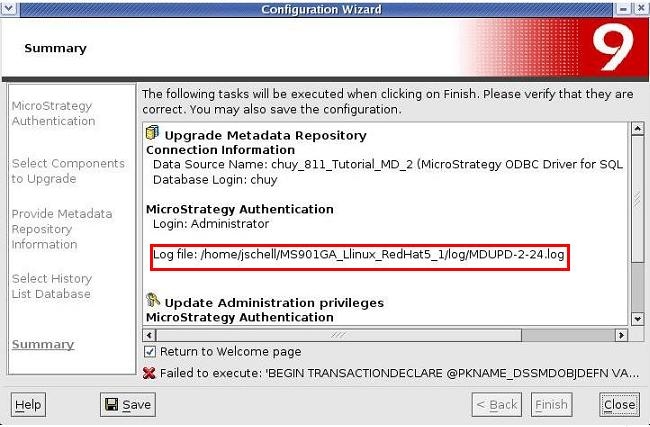
The MDUPD x-y.log file is not generated under the specified directory when the upgrade process fails due to a database error when using the Strategy Configuration Wizard 9.4.x - 10.x. 
 

ka04W00000147pcQAA_0EM440000002AtP.jpeg

STEPS TO REPRODUCE
Execute the following in Strategy Tutorial:
  • Open Strategy Configuration Wizard and configure the Strategy Intelligence Server to run against a metadata that needs to be upgraded
  • To upgrade the metadata, select the option 'Upgrade existing environment'
  • Provide the Strategy username and password.
  • Select the following components to be upgraded:
     Upgrade Metadata Repository and required projects
     
  • On the Summary page notice that the MDUPD-X-Y.log  will be created under <HOME>/log.
  • Click on Finish to start the upgrade process. 
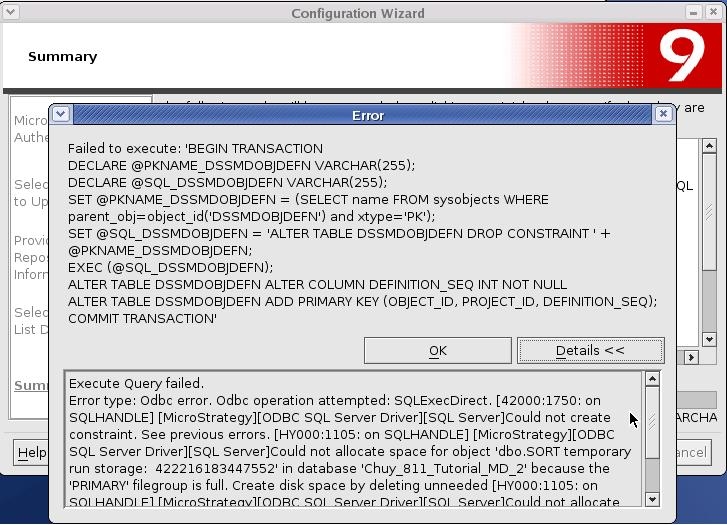
  • To simulate this example, the SQL Server 2005 database properties for Auto Growth were set too low so that a Database error would be experienced as shown below:
     
ka04W00000147pcQAA_0EM440000002AtR.jpeg
  • After receiving this error, when looking for the  MDUPD log file, the Administrator notices that it has not been generated in the log directory specificed.   

CAUSE
Since the actual metadata (database) upgrade did not get initiated at the time of the error, it is expected that the MDUPD log does not get generated. 
 
ACTION
User can refer to the Configuration Wizard logs (MACfgWiz.xml) to understand the cause of the metadata upgrade error/failure.


Comment

0 comments

Details

Knowledge Article

Published:

March 30, 2017

Last Updated:

March 30, 2017