EducationSoftwareStrategy.com
StrategyCommunity

Knowledge Base

Product

Community

Knowledge Base

TopicsBrowse ArticlesDeveloper Zone

Product

Download SoftwareProduct DocumentationSecurity Hub

Education

Tutorial VideosSolution GalleryEducation courses

Community

GuidelinesGrandmastersEvents
x_social-icon_white.svglinkedin_social-icon_white.svg
Strategy logoCommunity

© Strategy Inc. All Rights Reserved.

LegalTerms of UsePrivacy Policy
  1. Home
  2. Topics

KB327884:The position of the toggle shifts to other column when drilling on interactive grid widget containing derived metrics in MicroStrategy Mobile 10.x for iOS


Community Admin

• Strategy


The position of a toggle shifts to another column when drilling on an interactive grid widget containing derived metrics in MicroStrategy Mobile 10.x for iOS.

SYMPTOM:
The position of a toggle shifts to another column when drilling on an interactive grid widget containing derived metrics in Strategy Mobile 10.x for iOS.
Follow the steps below to reproduce the issue in Tutorial project:

  1. Create an Intelligent Cube with the following attributes: Category, Subcategory and metric Cost, Profit.
  2. Create a report on the cube with the following attributes: Category, Cost and Profit.
  3. Create a report services document on the created report and create two derived metrics: M1 and M2
  4. In above document ,insert an interactive grid widget, using the Category and 4 other metrics. Only Column 3 has toggle, as below:
    Column 1:Cost, Column 2: Profit, Column 3:M1 and M2 
  5. Run it on an iPhone with Strategy Mobile 10.x. Tap on the Category attribute to drill into it. In the drilled report, there are only two columns: the 1st column has the toggle mark with 3 metrics.
  6. If all metrics are non Derived metrics, this issue would not happen.

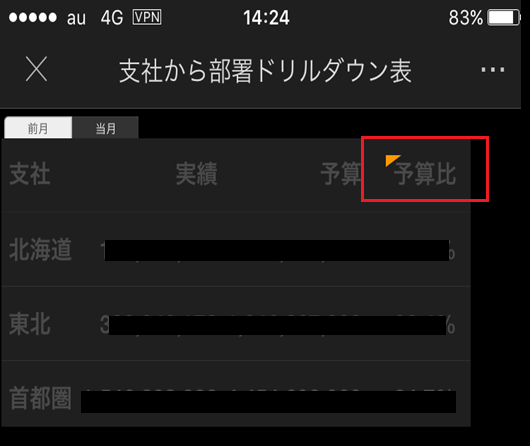
Before drilling:
The toggle is on 3rd column.
ka04W000000OfjaQAC_0EM4400000029n1.jpeg

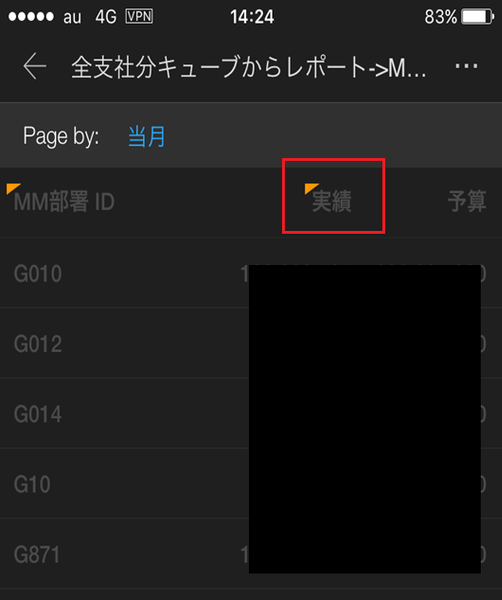
After drilling:
The toggle appears for 1st column.
ka04W000000OfjaQAC_0EM4400000029n3.jpeg

 
CAUSE:
This is a known issue with Strategy Mobile 10.x for iOS.
 
ACTION:
This issue has been fixed in Strategy Mobile 10.9 and newer, upgrade this version to take advantage of the fix.
 
KB09009


Comment

0 comments

Details

Knowledge Article

Published:

April 10, 2017

Last Updated:

May 8, 2018