EducationSoftwareStrategy.com
StrategyCommunity

Knowledge Base

Product

Community

Knowledge Base

TopicsBrowse ArticlesDeveloper Zone

Product

Download SoftwareProduct DocumentationSecurity Hub

Education

Tutorial VideosSolution GalleryEducation courses

Community

GuidelinesGrandmastersEvents
x_social-icon_white.svglinkedin_social-icon_white.svg
Strategy logoCommunity

© Strategy Inc. All Rights Reserved.

LegalTerms of UsePrivacy Policy
  1. Home
  2. Topics

KB32800: The Audit button is disabled, grayed out, when trying to generate an audit report in MicroStrategy License Manager


Community Admin

• Strategy


License Manager does not enable the Audit button unless there is a valid Project Source for a three tier environment is associated to the Intelligence Server

SYMPTOM:
The Audit button is disabled, grayed out, when trying to generate an audit report on the Strategy Intelligence Server machine using Strategy License Manager as shown below:
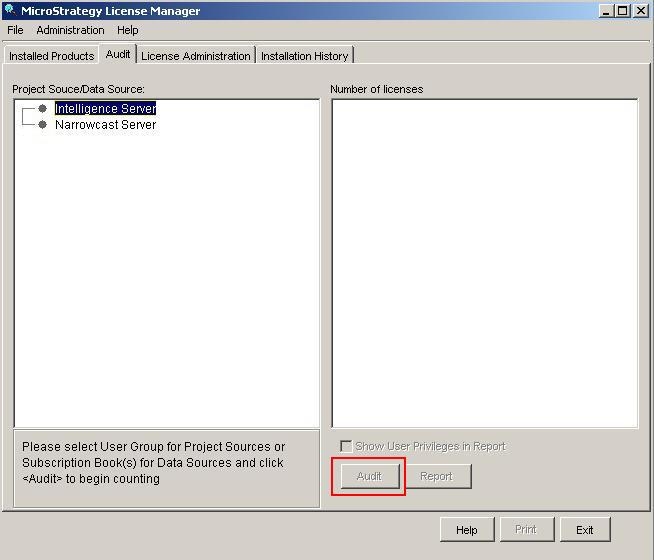
 

ka04W000000OhEeQAK_0EM440000002Arl.jpeg


CAUSE:
A 3-tier Project Source does not exist on the machine running Strategy License Manager. An audit can only be performed only through 3-tier Project Sources.
 
 
ACTION:
Create a 3-tier Project Source pointing to the desired Strategy Intelligence Server machine on the machine running Strategy License Manager. It is recommended to run Strategy License Manager locally on the Strategy Intelligence Server machine:

  1. Open Strategy Developer.
  2. Navigate to Tools > Project Source Manager
  3. Click Add
  4. Enter a name for the Project Source
  5. Make sure the connection mode is set to Server
  6. Enter the IP address or machine name for the Intelligence Server
  7. Save the Project Source


Comment

0 comments

Details

Knowledge Article

Published:

May 30, 2017

Last Updated:

May 30, 2017