EducationSoftwareStrategy.com
StrategyCommunity

Knowledge Base

Product

Community

Knowledge Base

TopicsBrowse ArticlesDeveloper Zone

Product

Download SoftwareProduct DocumentationSecurity Hub

Education

Tutorial VideosSolution GalleryEducation courses

Community

GuidelinesGrandmastersEvents
x_social-icon_white.svglinkedin_social-icon_white.svg
Strategy logoCommunity

© Strategy Inc. All Rights Reserved.

LegalTerms of UsePrivacy Policy
  1. Home
  2. Topics

KB32813: Subscription Creation Wizard in MicroStrategy Developer 9.x and 10.x does not allow prompt answers to be entered when subscribing prompted reports or documents.


Stefan Zepeda

Salesforce Solutions Architect • Strategy


Subscription Creation Wizard in MicroStrategy Developer 9.x and 10.x does not allow prompt answers to be entered when subscribing prompted reports or documents.

SYMPTOM:
Subscriptions can be created from Strategy Developer 9.x and 10.x using the Subscription Creation Wizard, as shown:
 

ka02R000000kVbHQAU_0EM440000002E8C.jpeg

 
When creating any type of subscription for a prompted report or Report Services document using the Subscription Creation Wizard, it is not possible to specify any prompt answers.
 
 
CAUSE:
This is a known issue with Strategy Developer 9.x and 10.x.
 
 
ACTION:
Contact Strategy Technical Support for an update on the status of this issue.
 
 
WORKAROUND:
Create the subscription by right-clicking the prompted report or Report Services document in Strategy Developer 9.x and 10.x, and using the option 'Schedule delivery to', as shown:
 

ka02R000000kVbHQAU_0EM440000002E8E.jpeg

 
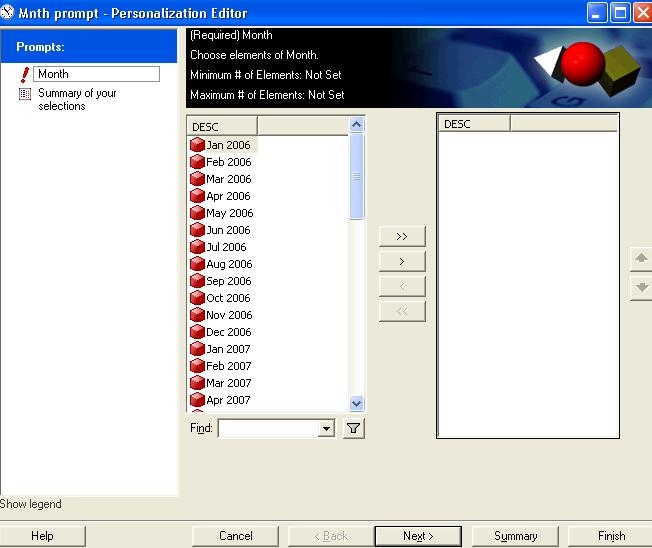
This opens the Personalization Editor to answer the prompt(s) correctly, as shown:
 

ka02R000000kVbHQAU_0EM440000002E8A.jpeg


Comment

0 comments

Details

Knowledge Article

Published:

May 31, 2017

Last Updated:

May 31, 2017