EducationSoftwareStrategy.com
StrategyCommunity

Knowledge Base

Product

Community

Knowledge Base

TopicsBrowse ArticlesDeveloper Zone

Product

Download SoftwareProduct DocumentationSecurity Hub

Education

Tutorial VideosSolution GalleryEducation courses

Community

GuidelinesGrandmastersEvents
x_social-icon_white.svglinkedin_social-icon_white.svg
Strategy logoCommunity

© Strategy Inc. All Rights Reserved.

LegalTerms of UsePrivacy Policy
  1. Home
  2. Topics

KB32826: Formatting is not being applied to AutoText in a Report Service Document in MicroStrategy


Stefan Zepeda

Salesforce Solutions Architect • Strategy


This article notes how autotexts on documents are not subject to formatting

SYMPTOM:
Formatting is not being applied to AutoText within a Report Service Document in Strategy.
 
STEPS TO REPRODUCE:
Execute the following in Strategy Tutorial:
 

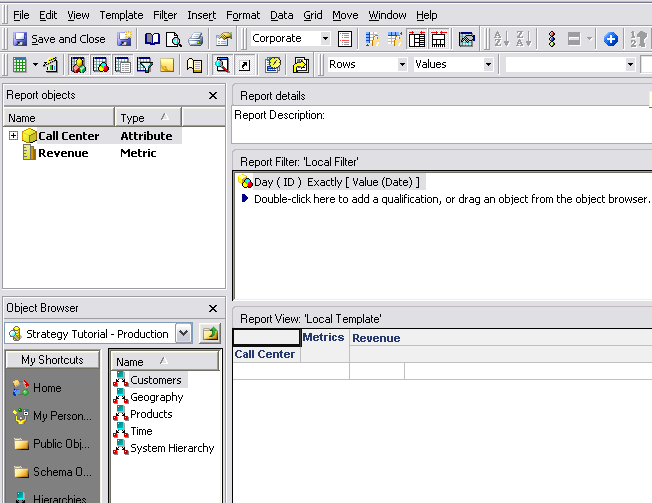
  • Create a new report with the attribute Call Center and the metric Revenue.
  • Create a new Date Prompt as show below:
     
ka02R000000kWLWQA2_0EM440000002V8L.jpeg
  • Add the Date prompt into the report as show below:
     
ka02R000000kWLWQA2_0EM440000002V8E.jpeg
  • Create a new Report Service Document and add the {&Prompt1&} AutoText along with using the report above as the dataset:
     
ka02R000000kWLWQA2_0EM440000002V8P.jpeg
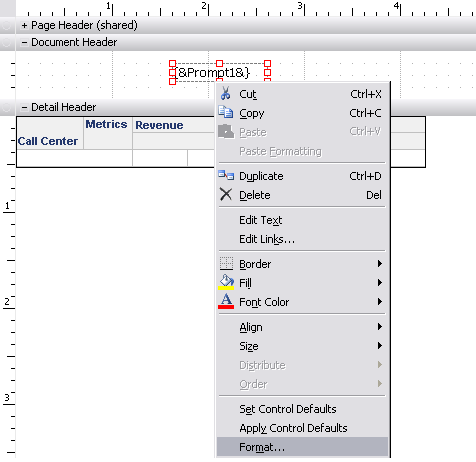
  • Right click on the AutoText and select Format:
     
ka02R000000kWLWQA2_0EM440000002V8N.jpeg
  • Under the Number tab, select the Date Category and any Formatting as show below:
     
ka02R000000kWLWQA2_0EM440000002V8C.jpeg
  • Execute the Report Sevice Document and resolve the prompt:
     
  • Check that the Date prompt AutoText does not show respective of the formatting change:
     
ka02R000000kWLWQA2_0EM440000002V8J.jpeg

CAUSE:
This is working by design in Strategy.  Formatting properties cannot be applied to AutoText values. 


Comment

0 comments

Details

Knowledge Article

Published:

July 18, 2017

Last Updated:

July 18, 2017