EducationSoftwareStrategy.com
StrategyCommunity

Knowledge Base

Product

Community

Knowledge Base

TopicsBrowse ArticlesDeveloper Zone

Product

Download SoftwareProduct DocumentationSecurity Hub

Education

Tutorial VideosSolution GalleryEducation courses

Community

GuidelinesGrandmastersEvents
x_social-icon_white.svglinkedin_social-icon_white.svg
Strategy logoCommunity

© Strategy Inc. All Rights Reserved.

LegalTerms of UsePrivacy Policy
  1. Home
  2. Topics

KB32852: Difference between Processing Unit Priority and Warehouse Execution Priority columns in the job monitor in MicroStrategy Desktop 9.x and higher


Community Admin

• Strategy


MicroStrategy 9.x and higher Job monitor displays two different columns for job priority. These are described below:

Strategy 9.x and higher Job monitor displays two different columns for job priority. These are described below:
 
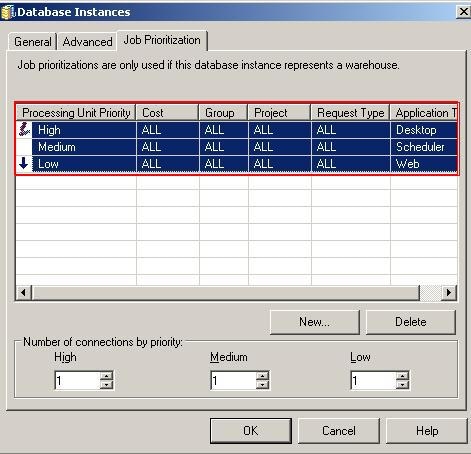
Processing Unit (PU) Priority - displays the Intelligence Server priority of the job. This priority is based on the job prioritization map and classified as low, medium, or high as seen below:
ka04W000000Of7qQAC_0EM440000002AtL.jpeg

 
Warehouse Execution Priority - displays the database priority of the job. This priority is based on the number of connections to the warehouse and classified as low, medium, or high as seen below:

ka04W000000Of7qQAC_0EM440000002AtN.jpeg

 
The following example demonstrates the difference between the above two columns in the job monitor:
Note: The example makes use of the Processing Unit Trace (which can be enabled under Diagnostics Configuration)

  • Create a Job Prioritization map based on Application Type as seen below:
ka04W000000Of7qQAC_0EM440000002AtJ.jpeg
  • The above map indicates the following:
    • Web Jobs: PU priority: 999 = LOW
    • Scheduler Jobs: PU priority: 666 = MEDIUM
    • Desktop Jobs: PU priority: 332 = HIGH
  • In the Job Prioritization map above, notice the Number of Connection is set to 1 for each high, medium and low type.
  • Create a simple report with attribute Year.
  • Create a subscription to the above report and execute it.
  • Log in to Strategy Desktop and execute any two reports.
  • Log in to Strategy Web and execute another set of two reports.
  • Go to the Job Monitor in Strategy Desktop. Notice the 5 different jobs below. Because there is only 1 High, Medium and Low threads (Step 2), only 3 jobs are currently executing. The other 2 jobs are in Waiting status with Warehouse Execution Priority as "Not Assigned".
ka04W000000Of7qQAC_0EM440000002AtK.jpeg
  • Also notice the Processing Unit Priority is applied based on the job prioritization map created in Step 1.
     
    The job executed from Strategy Web is assigned the PU priority of LOW. This can also be confirmed from the PU Trace below (999= LOW):

    Sample Code/Error
    MSIPU::Enter: Entered job:134 into PU:QueryExecution (id: 102), PU priority: 999.

     
    The job executed from Strategy Scheduler is assigned the PU priority of MEDIUM. This can also be confirmed from the PU Trace below (666 = MEDIUM):

    Sample Code/Error
    MSIPU::Enter: Entered job:138 into PU:QueryExecution (id: 102), PU priority: 666.

     
    The job executed from Strategy Desktop is assigned the PU priority of HIGH. This can also be confirmed from the PU Trace below (332 = HIGH):

    Sample Code/Error
    MSIPU::Enter: Entered job:133 into PU:QueryExecution (id: 102), PU priority: 332.


Comment

0 comments

Details

Knowledge Article

Published:

June 2, 2017

Last Updated:

June 2, 2017