In Strategy, users can trace Strategy Intelligent Cube activity via the Cube Server Trace which can be enabled through Strategy Diagnositcs Configuration as seen below:
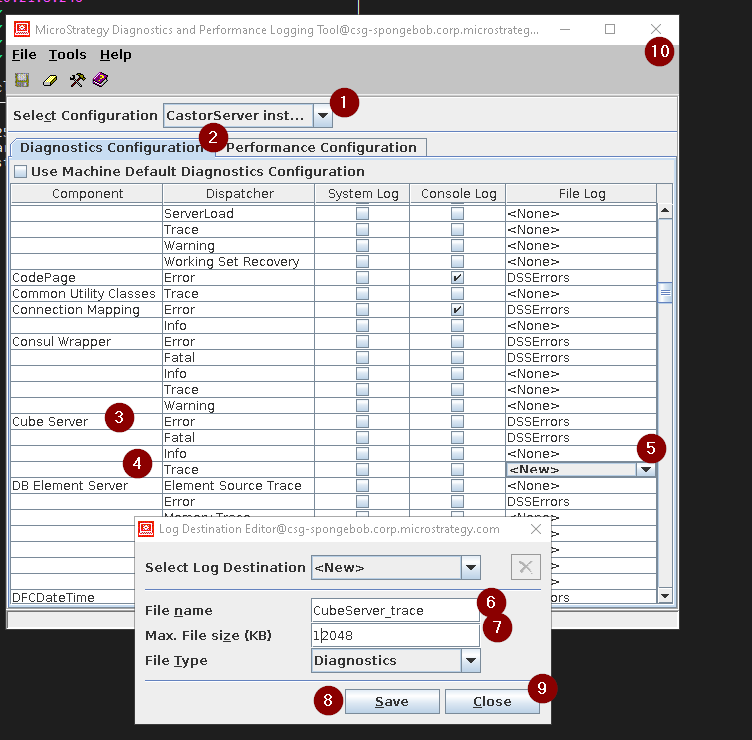
The following section displays excerpt from the Cube Server trace when different actions are performed on the Strategy Intelligent Cube.
When an Intelligent Cube is published:
Cube Manager: creating entry for job  94
Cube Pool Table: Cube with ID FE86D63D497CFAA2EA14908D5C2C7D25 is added
Cube Manager: entry with ID FE86D63D497CFAA2EA14908D5C2C7D25 is added to Lookup bucket 12 by job 94
Cube Manager: start persisting C:\Program Files\MicroStrategy\Intelligence Server\Cube\
TEST\Server_TEST_PB19DEDCC11D4E0EFC000EB9495D0F44F\FE86D63D497CFAA2EA14908D5C2C7D25.cube
Cube Manager: finish persisting C:\Program Files\MicroStrategy\Intelligence Server\Cube\
TEST\Server_TEST_PB19DEDCC11D4E0EFC000EB9495D0F44F\FE86D63D497CFAA2EA14908D5C2C7D25.cube
Cube Manager: start persisting C:\Program Files\MicroStrategy\Intelligence Server\Cube\
TEST\Server_TEST_PB19DEDCC11D4E0EFC000EB9495D0F44F\FE86D63D497CFAA2EA14908D5C2C7D25_info.cube
Cube Manager: finish persisting C:\Program Files\MicroStrategy\Intelligence Server\Cube\
TEST\Server_TEST_PB19DEDCC11D4E0EFC000EB9495D0F44F\FE86D63D497CFAA2EA14908D5C2C7D25_info.cube
Loading cube instance
C:\Program Files\MicroStrategy\Intelligence Server\Cube\TEST\
Server_TEST_PB19DEDCC11D4E0EFC000EB9495D0F44F\FE86D63D497CFAA2EA14908D5C2C7D25.cube.
Cube Instance loaded. Cube Name IC01, CubeInstId FE86D63D497CFAA2EA14908D5C2C7D25.
Cube Manager: start persisting C:\Program Files\Strategy
\Intelligence Server\Cube\TEST\
Server_TEST_PB19DEDCC11D4E0EFC000EB9495D0F44F\FE86D63D497CFAA2EA14908D5C2C7D25_info.cube
Cube Manager: finish persisting C:\Program Files\MicroStrategy\Intelligence Server\Cube\
TEST\Server_TEST_PB19DEDCC11D4E0EFC000EB9495D0F44F\FE86D63D497CFAA2EA14908D5C2C7D25_info.cube
Loading cube instance C:\Program Files\MicroStrategy\Intelligence Server\Cube\
TEST\Server_TEST_PB19DEDCC11D4E0EFC000EB9495D0F44F\FE86D63D497CFAA2EA14908D5C2C7D25.cube.
Cube Pool Table: Cube with ID FE86D63D497CFAA2EA14908D5C2C7D25 is removed
Cube unload. Cube Name IC, CustInstId 82FF22594C76153CA7E7C6B705A8D8B8.
