EducationSoftwareStrategy.com
StrategyCommunity

Knowledge Base

Product

Community

Knowledge Base

TopicsBrowse ArticlesDeveloper Zone

Product

Download SoftwareProduct DocumentationSecurity Hub

Education

Tutorial VideosSolution GalleryEducation courses

Community

GuidelinesGrandmastersEvents
x_social-icon_white.svglinkedin_social-icon_white.svg
Strategy logoCommunity

© Strategy Inc. All Rights Reserved.

LegalTerms of UsePrivacy Policy
  1. Home
  2. Topics

KB32882: How to customize the error message "Maximum number of result rows retrieved per report was exceeded. Error Code = -2147205488" in MicroStrategy Web


Community Admin

• Strategy


Users may wish to customize the error message displayed to MicroStrategy Web users when the maximum number of result rows retrieved per report is exceeded in MicroStrategy Web 9.3.x - 9.4.x.

Users may wish to customize the error message displayed to Strategy Web users  when the maximum number of result rows retrieved per report is exceeded in Strategy Web 9.3.x - 9.4.x.
 
When this error is hit  using the out of the box Strategy Web environment, the following error message is as follows:

ka04W000000Og8vQAC_0EM440000002Gud.jpeg


Maximum number of result rows retrieved per report was exceeded. <n> it is set for report <report Name>... Error Code = -2147205488

  
This particular error message is not stored in the bundle file but in one of the Java classes. The customization of the message can be done by adding a new entry in the error list via Customization Editor.
   
STEPS TO CUSTOMIZE: 

    • Open Strategy Customization Editor.
    • Go to Application Setting > Error List > Errors.
    • Add a new error ID (-2147205488) with the customized error message, as shown below:
       
       
ka04W000000Og8vQAC_0EM440000002Gue.jpeg


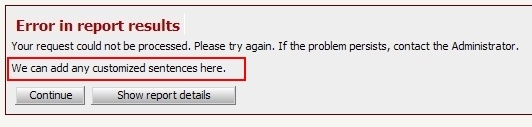
  • Save the page, and restart the application/web server. The error message will now  be changed  as shown below: 
     
ka04W000000Og8vQAC_0EM440000002Gun.jpeg
  • To change the error message for the document execution page follow steps 1-4 with error ID (-2147466604).

 
CUSTOMIZATION WARNING
This customization is provided as a convenience to Strategy users and is only directly applicable to the version stated. While this code may apply to other releases directly, Strategy Technical Support makes no guarantees that the code provided will apply to any future or previous builds. In the event of a code change in future builds, Strategy Technical Support makes no guarantee that an updated version of this particular customization will be provided. In the event of a code change in future builds, Strategy may not be able to provide additional code on this matter even though this customization is provided at this time for this specific build. For enhancements to this customization or to incorporate similar functionality into other versions, contact your Account Executive to inquire about Strategy consulting assistance.


Comment

0 comments

Details

Knowledge Article

Published:

June 22, 2017

Last Updated:

June 22, 2017