SYMPTOM
A Freeform SQL report is created in Strategy Developer and 9.x, to retrieve data from a stored procedure in Microsoft SQL Server. The Freeform SQL definition uses SQL Server syntax to execute the stored procedure:
EXEC
The procedure's output columns are mapped onto Strategy attribute forms and metrics, in the usual way for Freeform SQL reports.
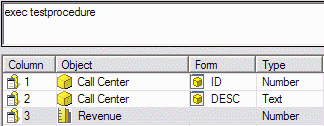
When the Freeform SQL report is executed in a two-tier connection, the results are the same as running the EXEC statement directly against the warehouse, using the Strategy DB Query Tool or Microsoft SQL Server Management Studio. In a three-tier connection, however, the results are different.
|
|
CAUSE
This behavior occurs because of the application of the Strategy governing setting for the maximum number of report result rows. The governing setting, found in Project Configuration > Governing, is not used during two-tier execution, but it is applied in the Intelligence Server in three-tier or four-tier connections.
The Strategy Query Engine applies the row limit governor by setting an ODBC connection parameter, SQL_ATTR_MAX_ROWS. The Microsoft SQL Server ODBC driver handles this parameter by issuing a statement against the database, SET ROWCOUNT n, where n is the value of the governing setting. The row count applies in SQL Server not only to the stored procedure's final results, but also to intermediate query results used within the procedure. If an intermediate result exceeds the row count, Microsoft SQL Server does not fail execution with an error; it simply truncates the intermediate dataset to the specified number of rows.
In the above example, the stored procedure creates an intermediate table containing all customer IDs (of which there are 10,000 in the Strategy Tutorial warehouse). The two-tier result includes all 10,000 customers in the final aggregation. In three-tier, the intermediate table is restricted to 1000 customers (by setting the Strategy row limit governor to 1000). Then, the final aggregation covers a subset of the customers, and the metric results are different.
Note that the same behavior can be reproduced in Microsoft SQL Server Management Studio by executing "SET ROWCOUNT 1000" before executing the stored procedure. Therefore, the issue is not specific to Strategy.
ACTION
The Strategy row limit governor can be disabled in individual reports by using the Results Set Row Limit VLDB property under the Governing category. The default value is -1, which allows the project-level governor to apply. Setting the property to 0 overrides the project-level governor to permit an unlimited number of rows for this report only.
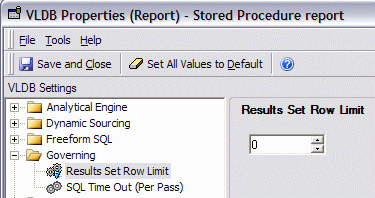
After this change, the report will return the same results as in two-tier.
It is not necessary to disable row-limit governing globally for the project.
Note: This issue might not occur with Strategy Intelligence Server Universal in Linux/UNIX environments. In operating systems other than Microsoft Windows, Strategy ships the SQL Server Wire Protocol driver from DataDirect. This driver handles SQL_ATTR_MAX_ROWS differently from the native Microsoft driver, and may not trigger the behavior in the database.
