EducationSoftwareStrategy.com
StrategyCommunity

Knowledge Base

Product

Community

Knowledge Base

TopicsBrowse ArticlesDeveloper Zone

Product

Download SoftwareProduct DocumentationSecurity Hub

Education

Tutorial VideosSolution GalleryEducation courses

Community

GuidelinesGrandmastersEvents
x_social-icon_white.svglinkedin_social-icon_white.svg
Strategy logoCommunity

© Strategy Inc. All Rights Reserved.

LegalTerms of UsePrivacy Policy
  1. Home
  2. Topics

KB32897: Ability to change the SQL execution timeout for inserts into Statistics tables in MicroStrategy 9.x and 10.x


Community Admin

• Strategy


Ability to change the SQL execution timeout for inserts into Statistics tables in MicroStrategy 9.x and 10.x

On Strategy Intelligence Server 9.x and 10.x, the default SQL execution timeout for inserting into Statistics tables is 10 seconds. In environments where there is a high load on the database server hosting the Statistics tables, sometimes, Statistics failed to get inserted into the Statistics tables as the 10 second SQL execution timeout is not sufficient. Starting with Strategy 9.0.1, it is possible for administrators to modify the value for this timeout.
 
Implement the steps below to change the value of the SQL execution timeout:

  • From Strategy Command Manager 9.x and 10.x, connect to the 3-tier project source pointing to the Strategy Intelligence Server for which the timeout needs to be changed.
  • Execute the following script to list the current properties for the required project. The name of the property corresponding to the SQL execution timeout is 'SQL Timeout (Seconds)'


    LIST ALL  PROPERTIES FOR STATISTICS IN PROJECT "Name_Of_project";


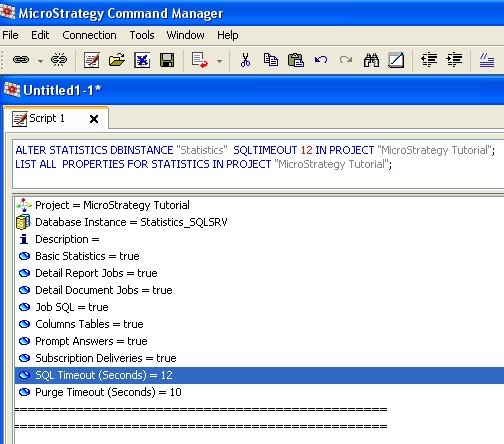
  • Run the following command to alter the SQL execution timeout to the required value. In this example, the value is modified to 12 seconds.


    ALTER STATISTICS DBINSTANCE "Name_Of_Statistics_DBInstance"  SQLTIMEOUT 12 IN PROJECT "Name_Of_project";


ka04W000000ObKRQA0_0EM440000002At7.jpeg

Comment

0 comments

Details

Knowledge Article

Published:

June 5, 2017

Last Updated:

June 5, 2017