The following Visual Basic 6.0 code snippet shows how to read the Warehouse Catalog Tables and display the table prefix if one was set.
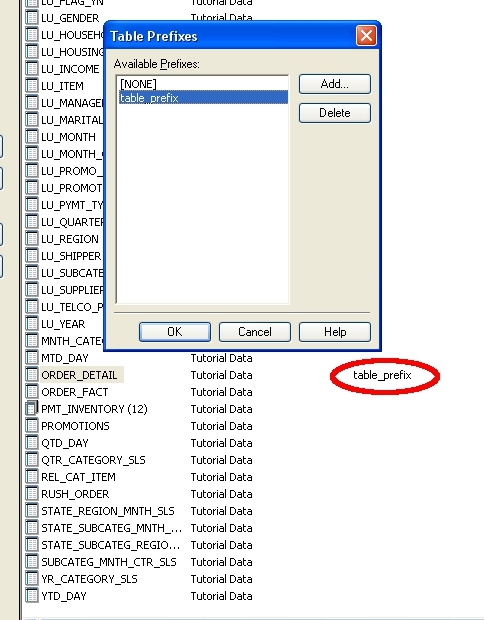
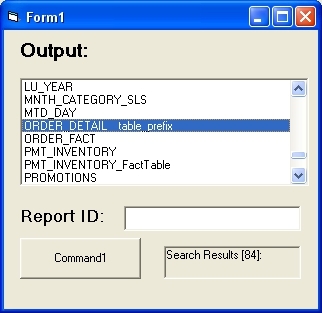
The code uses the Intelligence Server API and has been tested with Strategy 9.0.1

DB Tables
'Allocate a search object...
Dim objSearch As IDSSSearch
Set objSearch = objSource.NewObject(DssTypeSearch)
'Set the search criteria...
'objSearch.NamePattern = txtNamePattern
'objSearch.Types.Add DssTypeReportDefinition
'objSearch.Types.Add EnumDSSSubTypes.DssTypeDbTable
objSearch.Types.Add DssTypeDbTable
'Execute the search...
Dim objSearchFolder As IDSSFolder
Set objSearchFolder = objSearch.Execute
'Display the number of children...
lblSearchResults = "Search Results :"
'Clear out the contents of the current list box...
lstBox.Clear
'Display the contents of the folder...
Dim objChild As IDSSDBTable
Dim prefixStr As String
prefixStr = ""
For Each objChild In objSearchFolder
'When prefix is not set the object objChild.TableSource.Prefix does not exist
'We only want to read the variable if it does exist
If Not objChild.TableSource Is Nothing Then
prefixStr = objChild.TableSource.Prefix
End If
'Output table name / prefix
lstBox.AddItem objChild.Info.Name & Chr(9) & prefixStr
'Reset prefix string var for next iteration of loop
prefixStr = ""
Next objChild
CUSTOMIZATION WARNING
This customization is provided as a convenience to Strategy users and is only directly applicable to the version stated. While this code may apply to other releases directly, Strategy Technical Support makes no guarantees that the code provided will apply to any future or previous builds. In the event of a code change in future builds, Strategy Technical Support makes no guarantee that an updated version of this particular customization will be provided. In the event of a code change in future builds, Strategy may not be able to provide additional code on this matter even though this customization is provided at this time for this specific build. For enhancements to this customization or to incorporate similar functionality into other versions, contact your Account Executive to inquire about Strategy consulting assistance.
