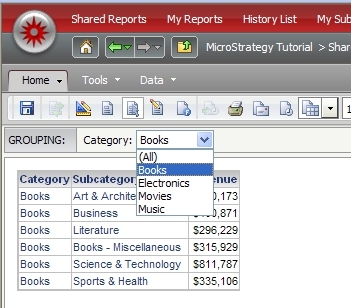
The following screenshot illustrates a Report Services Document with an attribute in the Grouping Section:
The following code snippet will execute the Report Services Document, loop through the elements in the page by and export each available element to PDF
public static void executeDocument() throws Exception {
  //Create connection with the Intelligence Server:
  iSession = createSession("localhost", "Strategy Tutorial", "administrator", "");
  //Create a new RWInstance from this session for a given Document ID.
  //Fetch the results in PDF View
  RWInstance rwi = iSession.getFactory().getRWSource().getNewInstance("88CFDDD442725CC86040D6BC9843A1B8", EnumRWExecutionModes.RW_MODE_PDF);
  //Get the prompts collection
  WebPrompts oprompts = rwi.getPrompts();

  WebElementsPrompt prompt = null;

  //Answer all prompts with default answers
  for(int i = 0; i < oprompts.size(); i++) {
   prompt = (WebElementsPrompt)oprompts.get(i);
   prompt.setAnswer(prompt.getDefaultAnswer());
  }

  oprompts.validate();
  oprompts.answerPrompts();

  //Make sure execution has finished in the Intelligence Server by checking the status
  while (rwi.pollStatus() != 1) Thread.sleep(2000);

  //rwi has been executed, find drop down control elements
  try{
   RWDefinition def = rwi.getDefinition();
   String key = null;
   rwi.getData();

   for (int i=0;i<def.getGroupBys().size();i++){
    RWGroupBy gb = def.getGroupBys().get(i);

    if(gb.getLevel() == EnumRWGroupByLevels.RWLEVEL_GROUP_START){

     RWGroupByUnit gbu = gb.getUnit();
     RWGroupByElements elem = gbu.getElements();
     key = gb.getKey();

     for (int x=0;x<elem.size();x++){
      System.out.println("Exporting: " + elem.get(x).getDisplayName());
      saveDocument(rwi,elem.get(x).getID(),key,elem.get(x).getDisplayName());
     }
    }
   }
  }catch(Exception e){
   e.printStackTrace();
  }
 }

 private static void save(byte[] data, String fileName) throws Exception {
   FileOutputStream fos = new FileOutputStream("c:\\temp\\" + fileName + ".pdf");
   fos.write(data);
   fos.close();
 }

 private static void saveDocument(RWInstance rwi, String element, String key, String fileName){
  try{

   RWManipulation rwManip = rwi.getRWManipulator();
   RWInstance newInst = null;

   rwManip.setCurrentGroupByElement(key, element, true);

   newInst = rwManip.applyChanges();
   RWExportSettings expSet = newInst.getExportSettings();

   expSet.setMode(EnumRWExportModes.RW_EXPORT_CURRENT);

   while (newInst.pollStatus() != 1) Thread.sleep(2000);

   //Once results are ready, fetch the data.
   data = newInst.getPDFData();
   save(data,fileName);

  }catch (Exception e) {
   e.printStackTrace();
  }
 }
RWDLoopPDF
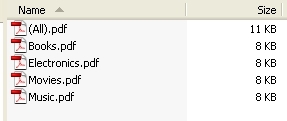
The code will generate a PDF for each element in the page by including the all selection
CUSTOMIZATION WARNING
This customization is provided as a convenience to Strategy users and is only directly applicable to the version stated. While this code may apply to other releases directly, Strategy Technical Support makes no guarantees that the code provided will apply to any future or previous builds. In the event of a code change in future builds, Strategy Technical Support makes no guarantee that an updated version of this particular customization will be provided. In the event of a code change in future builds, Strategy may not be able to provide additional code on this matter even though this customization is provided at this time for this specific build. For enhancements to this customization or to incorporate similar functionality into other versions, contact your Account Executive to inquire about Strategy consulting assistance.
