Users may find the Day Calendar Selector, shown in the image below, to be quite big and would like to reduce its size or minimize it to save space in Strategy Web 9.0.0.

However, there is a limitation in Strategy Web 9.0.0 where the calendar cannot be reized nor minimized.
While reducing the size of the calendar is not possible, in Strategy Web 9.0.1, it is possible to minimize the calendar when used as a widget instead of as a selector.
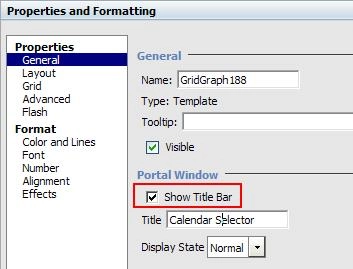
Follow these instructions to change the selector into a widget to allow minimizing of the calendar.


The Calendar Widget should be ready to be minimized and maximized, and should already be prepared for multi-selections as well by using the Shift key for consecutive selections or Ctrl key for individual selections, as shown in the images below.

