EducationSoftwareStrategy.com
StrategyCommunity

Knowledge Base

Product

Community

Knowledge Base

TopicsBrowse ArticlesDeveloper Zone

Product

Download SoftwareProduct DocumentationSecurity Hub

Education

Tutorial VideosSolution GalleryEducation courses

Community

GuidelinesGrandmastersEvents
x_social-icon_white.svglinkedin_social-icon_white.svg
Strategy logoCommunity

© Strategy Inc. All Rights Reserved.

LegalTerms of UsePrivacy Policy
  1. Home
  2. Topics

KB33062: How to limit the maximum number of concurrent sessions per user account in MicroStrategy 9.x?


Community Admin

• Strategy


MicroStrategy Web users will sometimes continue to open new sessions with their account by simply logging into MicroStrategy Web inside a new browser window, without logging out of the previous session. The following knowledge base article goes over the governing setting to limit the number of concurrent interactive project sessions.

Strategy Web users will sometimes continue to open new sessions with their account by simply logging into Strategy Web inside a new browser window, without logging out of the previous session. In other cases, users simply close the Web browser window which will keep their Strategy session alive in the background.
Since this behavior clogs the Intelligence Server with unnecessary user sessions, and if multiple users persist these activities, then the user limit on the project/server will be exceeded often.
 
Administrator can prevent this situation by limiting the maximum number of concurrent sessions per user as described in the steps below:
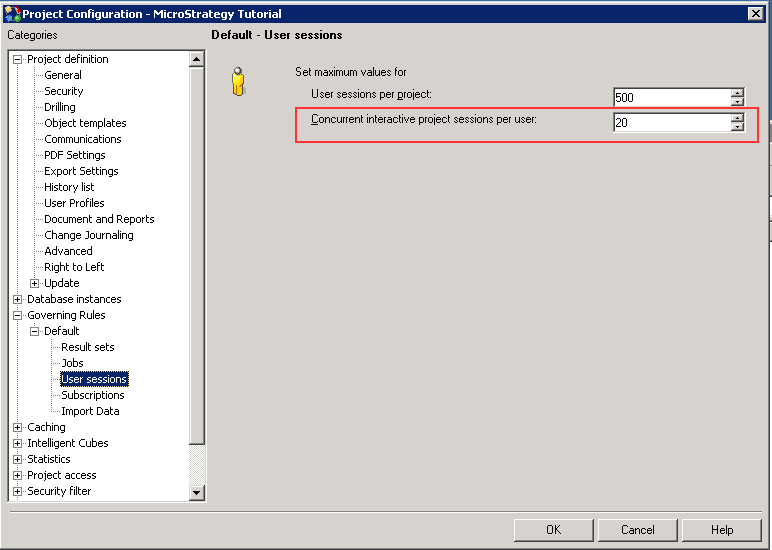
    1. In Strategy Developer, go to Project Configuration > Governing > User sessions. Define the value on the 'Concurrent interactive project sessions per user' as shown in the screenshot below:
ka04W000000OhbxQAC_0EM440000002LRI.png


  1.  This number is the maximum sessions per user applies to all Strategy products , like Desktop, Web and Object Manager.

Comment

0 comments

Details

Knowledge Article

Published:

May 10, 2017

Last Updated:

May 10, 2017