EducationSoftwareStrategy.com
StrategyCommunity

Knowledge Base

Product

Community

Knowledge Base

TopicsBrowse ArticlesDeveloper Zone

Product

Download SoftwareProduct DocumentationSecurity Hub

Education

Tutorial VideosSolution GalleryEducation courses

Community

GuidelinesGrandmastersEvents
x_social-icon_white.svglinkedin_social-icon_white.svg
Strategy logoCommunity

© Strategy Inc. All Rights Reserved.

LegalTerms of UsePrivacy Policy
  1. Home
  2. Topics

KB33081: How to create a new user and add the user to multiple user groups in MicroStrategy Command Manager 9.4.x-10.x?


Community Admin

• Strategy


This knowledge base article documents the process of creating a new user and adding the user to multiple user groups in MicroStrategy Command Manager 9.4.x-10.x.

The following steps show how to create a new user and add the user to multiple user groups in Strategy Command Manager 9.4.x-10.x:

  • Use the "CREATE USER" outline to write a script to create a new user. For example, to create a user with ID 'mstr_test' and full name "MSTR Test", type the following command:


      CREATE USER "mstr_test" PASSWORD "123" FULLNAME "MSTR Test" PASSWORDEXP NEVER;

  • Use the "ADD USER" outline to write a script to add the user to multiple user groups. For example, to add user "mstr_test" to group "Managers" and "Developers", type the following command:


      ADD USER "mstr_test" TO GROUP "Managers", "Developers"; 
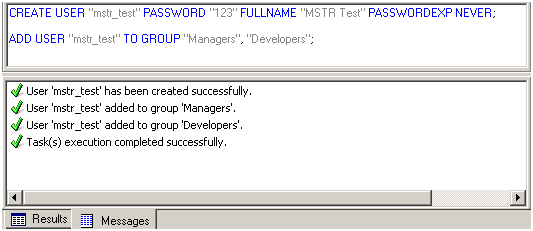
Execute the script in Strategy Command Manager.

ka04W000001MKlDQAW_0EM440000002As1.png

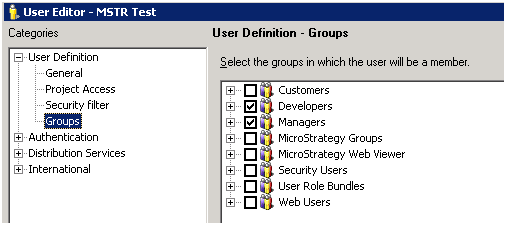
Login to Strategy Developer 9.4.x-10.x. The "mstr_user" has been created and added to "Managers" and "Developers" user group.
ka04W000001MKlDQAW_0EM440000002As2.png


Comment

0 comments

Details

Knowledge Article

Published:

April 10, 2017

Last Updated:

April 10, 2017