EducationSoftwareStrategy.com
StrategyCommunity

Knowledge Base

Product

Community

Knowledge Base

TopicsBrowse ArticlesDeveloper Zone

Product

Download SoftwareProduct DocumentationSecurity Hub

Education

Tutorial VideosSolution GalleryEducation courses

Community

GuidelinesGrandmastersEvents
x_social-icon_white.svglinkedin_social-icon_white.svg
Strategy logoCommunity

© Strategy Inc. All Rights Reserved.

LegalTerms of UsePrivacy Policy
  1. Home
  2. Topics

KB33115: When executing a exported Flash .mht file that is hosted on a web server, users receive a bootstrap error message in MicroStrategy Web


Community Admin

• Strategy


When executing a exported Flash .mht file that is hosted on a web server, users receive a bootstrap error message in MicroStrategy Web 9.x

SYMPTOM:
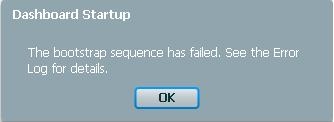
When executing a exported Flash file (.mht) that is hosted in a virtual directory or on a Web Server, users receive a bootstrap error:
 
STEPS TO REPRODUCE:
  • In Strategy Web, create a simple dashboard.
  • Export the dashboard to Flash (.mht format)
  • Place the .mht file in a virtual directory or on a Web Server in a location that can be accessed through a URL.
  • Try executing the .mht file through a browser by accessing the URL. A bootstrap error will occur.
     
ka04W000000OgH0QAK_0EM44000000281S.jpeg
  •  

    Sample Code/Error
     The bootstrap sequence has failed.  See the Error Log for details


CAUSE:
The issue is due to a limitation of Adobe Flash.  In Flash, a SWF file's security setting can either be local-read access or remote send, but not both. When Strategy exports an .mht file, the SWF file within the .mht file is set to 'local-read'.  As a result, it cannot be viewed through a URL because the browser attempts to use a remote send version of the dashboardviewer.swf file.
 
Refer to Technical Note KB20712 - "Why does Strategy create two versions of every widget?" for more information on the Adobe limitation..
 
ACTION:
Place the .mht file in a network drive, instead of in a virtual directory or web server.  If a Web server is necessary, zip up the .mht file first and host the .zip file.  Users can then download the .zip file, extract the .mht file, and run it locally.


Comment

0 comments

Details

Knowledge Article

Published:

June 16, 2017

Last Updated:

June 16, 2017