EducationSoftwareStrategy.com
StrategyCommunity

Knowledge Base

Product

Community

Knowledge Base

TopicsBrowse ArticlesDeveloper Zone

Product

Download SoftwareProduct DocumentationSecurity Hub

Education

Tutorial VideosSolution GalleryEducation courses

Community

GuidelinesGrandmastersEvents
x_social-icon_white.svglinkedin_social-icon_white.svg
Strategy logoCommunity

© Strategy Inc. All Rights Reserved.

LegalTerms of UsePrivacy Policy
  1. Home
  2. Topics

KB33139: The privilege for "Use Integrity manager" is grayed out when assigning privileges to a user as well as the security role editor.


Community Admin

• Strategy


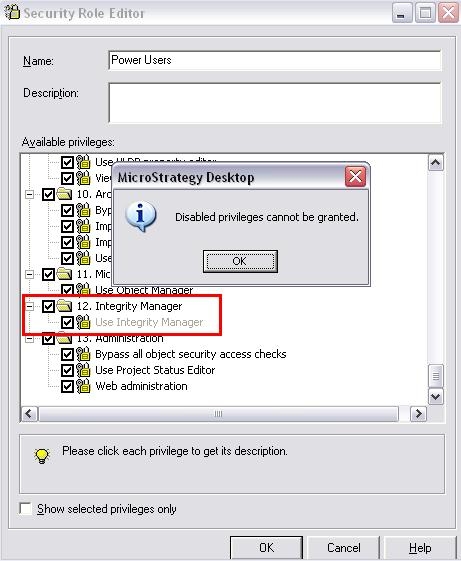
The privilege for "Use Integrity manager" is grayed out when assigning privileges to a user as well as the security role editor.

SYMPTOM:
When trying to enable the privilege for 'use integrity manager' the administrator will find that the option is grayed out in the user editor screen as well as the security role editor and the following message will appear:
 

ka04W000000OdqFQAS_0EM440000002E7F.jpeg

 
Sample Code/Error
"Disabled privileges cannot be granted"
 
 
CAUSE:
One possible cause for  this is that the license key provided does not have a license to use integrity manager for that installation.
 
ACTION:
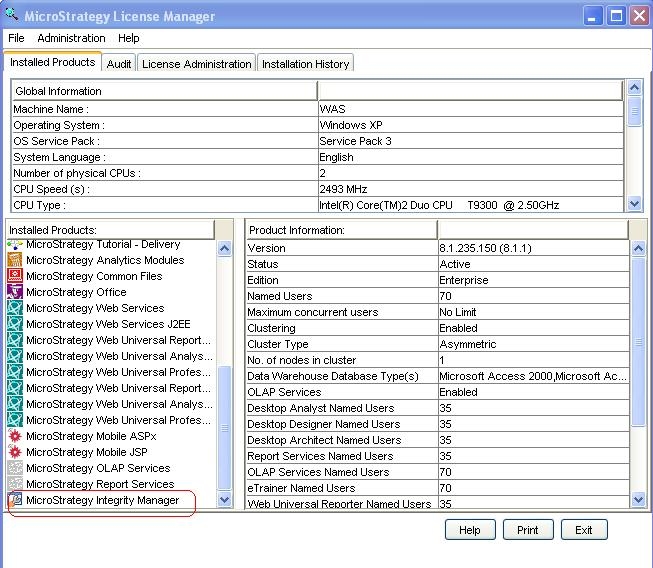
To verify if an installation is licensed to use the Integrity Manager product, opening the Strategy license manager, look under the 'installed products' section and confirm if the Integrity manager application is present.
 

ka04W000000OdqFQAS_0EM440000002E7E.jpeg


Comment

0 comments

Details

Knowledge Article

Published:

June 15, 2017

Last Updated:

June 15, 2017