EducationSoftwareStrategy.com
StrategyCommunity

Knowledge Base

Product

Community

Knowledge Base

TopicsBrowse ArticlesDeveloper Zone

Product

Download SoftwareProduct DocumentationSecurity Hub

Education

Tutorial VideosSolution GalleryEducation courses

Community

GuidelinesGrandmastersEvents
x_social-icon_white.svglinkedin_social-icon_white.svg
Strategy logoCommunity

© Strategy Inc. All Rights Reserved.

LegalTerms of UsePrivacy Policy
  1. Home
  2. Topics

KB33147: ‘[ODBC Text driver]File not found’ error occurs when executing a report in MicroStrategy Developer 9.x and 10.x


Stefan Zepeda

Salesforce Solutions Architect • Strategy


KB33147: ‘[ODBC Text driver]File not found’ error occurs when executing a report in MicroStrategy Developer 9.x and 10.x

SYMPTOM:
When executing a report whose data source consists of flat text files, the following error is displayed:
 
Sample Code/Error
Error:
Execution Failed
Error: SQL Generation CompleteQueryEngine encountered error: Execute Query failed. Error type: Odbc error: Odbc operation attempted: SQLExecDirect. File not found `/xxx/xxx’. Error in Process method of Component: QueryEngineServer. Project xxx, Job 1036, Error Code = -2147212544
 
However, the text file does exist in the location specified by the error, and all permissions are set correctly. Viewing the text file through the Warehouse Catalog is also successful.
 
CAUSE:
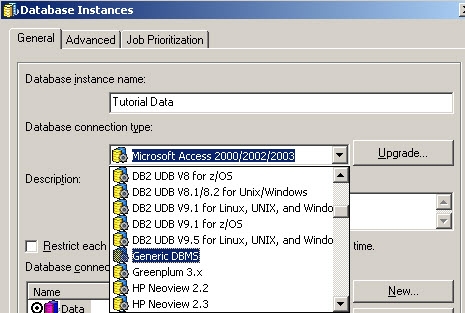
In the above case, the database connection type is incorrect.
 
ACTION:
Change the database connection type from Microsoft Excel to Generic Dbms
 

ka02R000000kXFOQA2_0EM440000002E60.jpeg


Comment

0 comments

Details

Knowledge Article

Published:

June 20, 2017

Last Updated:

June 20, 2017