All the Strategy Web pages are divided into sections as shown in the following screenshot:
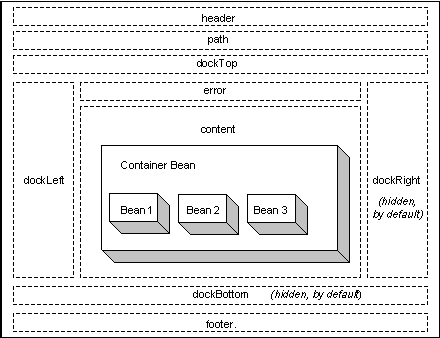
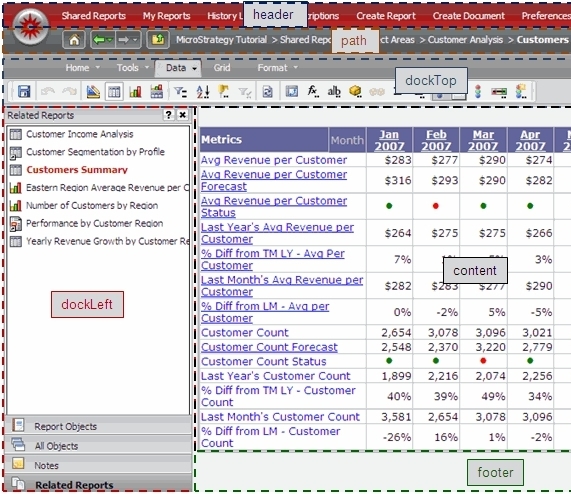
https://www2.microstrategy.com/producthelp/Current/WebSDK/Content/topics/pagecontent/Application_Page_Structure.htm
Adding a custom page to one of those sections is simple with the customizations editor.
https://www2.microstrategy.com/producthelp/Current/WebSDK/Content/topics/webcusteditor/WCE_Web_Customization_Editor.htm
If we want to add a custom page to the Welcome page for instance, create a custom jsp page and save it under the plugins\\jsp
For this example we created a page called ZZZ_test.jsp with the following contents:
Hello world
1. Using the customizations editor expand the following nodes:
Pages - welcome(Welcome)
2. Double click on the page or right click and select "Open in Editor"
3. Select the "Template Properties"
4. Click on the doc left section of the template and select the custom page created above
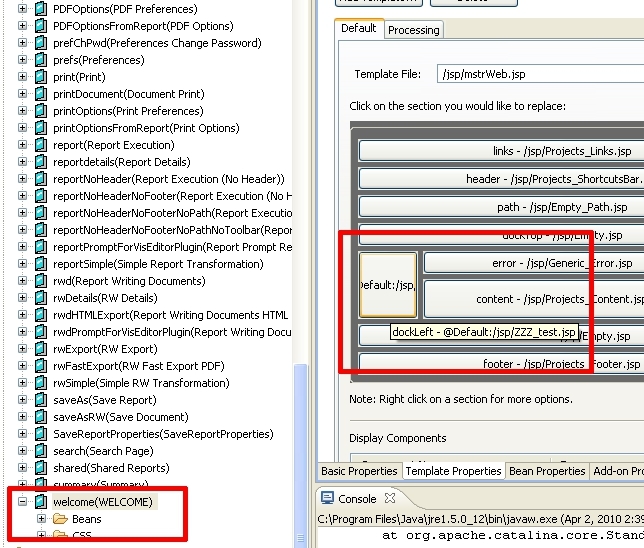
After completing the above steps the custom page will not display because some sections since they are not used by Strategy by default are hidden using CSS. By using the Firebug plugin in Mozilla Firefox, it is possible to analyse the HTML generated:

In the above screenshot , notice that the custom content was rendered correctly in the HTML but the CSS display is set to none effectively hiding it.
To resolve this, take the additional steps to correct the CSS from hiding the custom section.
Again using the customizations editor:
- Go to Pages – welcome(WELCOME) – CSS – Strategy Web – mstr - .mstrDockLeft and set display: block

- Do the same for Pages – welcome(WELCOME) – CSS – Strategy Web – pageProjects.css - .tdDockLeft and also change the display to block
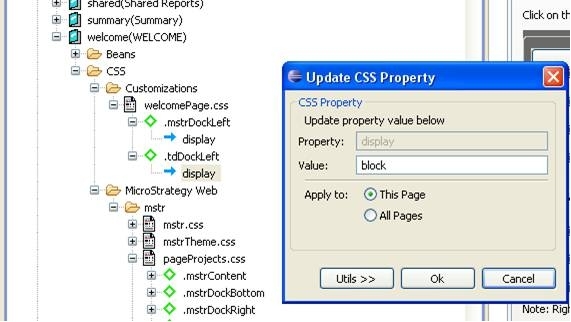
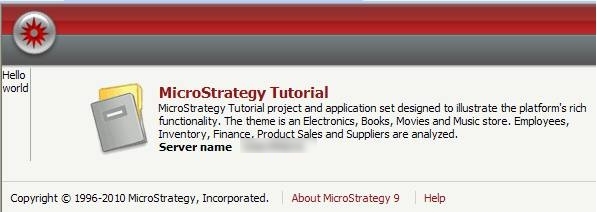
This will unlock the left doc section and will show the custom page:
CUSTOMIZATION WARNING
This customization is provided as a convenience to Strategy users and is only directly applicable to the version stated. While this code may apply to other releases directly, Strategy Technical Support makes no guarantees that the code provided will apply to any future or previous builds. In the event of a code change in future builds, Strategy Technical Support makes no guarantee that an updated version of this particular customization will be provided. In the event of a code change in future builds, Strategy may not be able to provide additional code on this matter even though this customization is provided at this time for this specific build. For enhancements to this customization or to incorporate similar functionality into other versions, contact your Account Executive to inquire about Strategy consulting assistance.
Third Party Software Installation:
WARNING:
The third-party product(s) discussed in this technical note is manufactured by vendors independent of Strategy. Strategy makes no warranty, express, implied or otherwise, regarding this product, including its performance or reliability.
