EducationSoftwareStrategy.com
StrategyCommunity

Knowledge Base

Product

Community

Knowledge Base

TopicsBrowse ArticlesDeveloper Zone

Product

Download SoftwareProduct DocumentationSecurity Hub

Education

Tutorial VideosSolution GalleryEducation courses

Community

GuidelinesGrandmastersEvents
x_social-icon_white.svglinkedin_social-icon_white.svg
Strategy logoCommunity

© Strategy Inc. All Rights Reserved.

LegalTerms of UsePrivacy Policy
  1. Home
  2. Topics

KB33156: Column width cannot be set to a fixed value in a MicroStrategy Report Service Document for 9.x and 10.x


Stefan Zepeda

Salesforce Solutions Architect • Strategy


KB33156: Column width cannot be set to a fixed value in a MicroStrategy Report Service Document for 9.x and 10.x

SYMPTOM:
When attempting to set a column width to a fixed value in Strategy Report Services 9.x and 10.x, users notice that the value is not preserved when saving the settings.
 
STEPS TO REPRODUCE:
 Follow the steps below to reproduce the issue:
 

  1. Create a Report Services Document based on a grid with one attribute in the rows and one metric on the columns.
  2. Edit the grid and navigate to Grid > Options. 
  3. Click on the 'Columns and Rows' tab to display the column settings
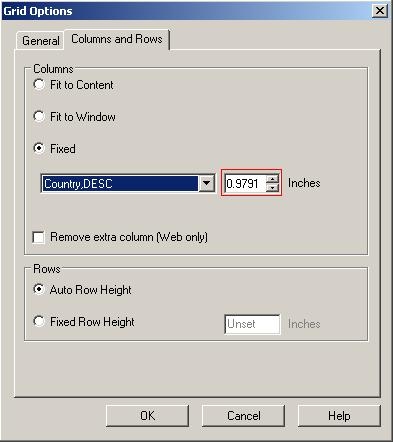
  4. Set one particular column to a Fixed value as shown below:
ka02R000000kXGhQAM_0EM440000002E66.jpeg


  • Click OK to apply the settings.
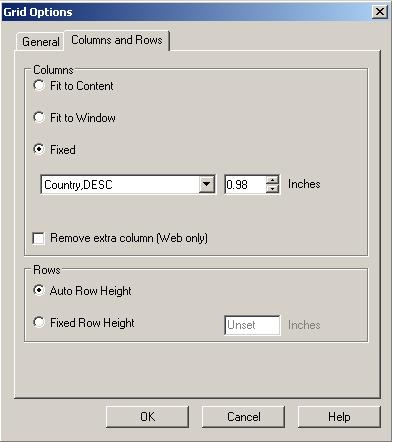
  • Re open the 'Grid options' menu and notice that the previously defined width for the column has not been preserved as shown in the image below:
ka02R000000kXGhQAM_0EM440000002E67.jpeg

CAUSE:
This is a known issue in Strategy Developer 9.x and 10.x
 
ACTION:
Contact Strategy Technical Support for an update of the issue.


Comment

0 comments

Details

Knowledge Article

Published:

June 19, 2017

Last Updated:

June 19, 2017