EducationSoftwareStrategy.com
StrategyCommunity

Knowledge Base

Product

Community

Knowledge Base

TopicsBrowse ArticlesDeveloper Zone

Product

Download SoftwareProduct DocumentationSecurity Hub

Education

Tutorial VideosSolution GalleryEducation courses

Community

GuidelinesGrandmastersEvents
x_social-icon_white.svglinkedin_social-icon_white.svg
Strategy logoCommunity

© Strategy Inc. All Rights Reserved.

LegalTerms of UsePrivacy Policy
  1. Home
  2. Topics

KB33206: Users receive an error when trying to register a MicroStrategy ScanMD DLL file on Windows 7


Community Admin

• Strategy


When trying to register a custom ScanMD DLL on Windows 7, despite logging in as the local Administrator, the following error is given

SYMPTOM:
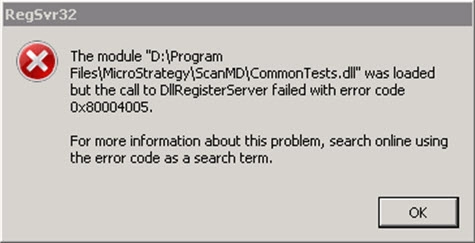
When trying to register a custom ScanMD DLL on Windows 7, despite logging in as the local Administrator, the following error is given:
 

ka04W000000Oc0SQAS_0EM440000002E5w.jpeg


The module “D:\Program Files\Strategy\ScanMD\Commontests.dll” was loaded but the call to DllRegisterServer failed with error code 0x80004005.

 
CAUSE:
The Command Prompt does not have Administrator permissions to register the DLL successfully.
 
ACTION:
To resolve this, navigate to Start > Programs > Accessories > Command Prompt, right-click and select to “Run as Administrator”.   Then re-register the DLL through the command line.


Comment

0 comments

Details

Knowledge Article

Published:

May 31, 2017

Last Updated:

May 31, 2017