EducationSoftwareStrategy.com
StrategyCommunity

Knowledge Base

Product

Community

Knowledge Base

TopicsBrowse ArticlesDeveloper Zone

Product

Download SoftwareProduct DocumentationSecurity Hub

Education

Tutorial VideosSolution GalleryEducation courses

Community

GuidelinesGrandmastersEvents
x_social-icon_white.svglinkedin_social-icon_white.svg
Strategy logoCommunity

© Strategy Inc. All Rights Reserved.

LegalTerms of UsePrivacy Policy
  1. Home
  2. Topics

KB33215: Some components are not listed in MicroStrategy Diagnostic Configuration tool 9.x or 10.x


Community Admin

• Strategy


This article describes a solution when certain components are not listed in the Diagnostic Configuration tool.

SYMPTOM:
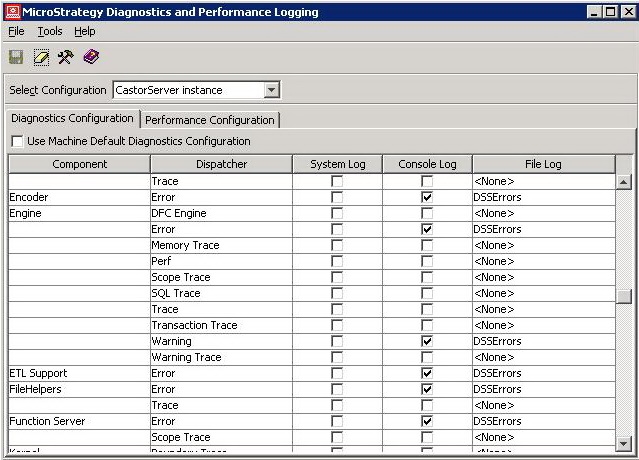
Certain components are not listed in the Diagnostic Configuration tool as expected, as shown in the image below:
                         

ka04W000000OhI7QAK_0EM440000002HSi.jpeg

 
Notice that the "Export Engine" component is not shown.
 
CAUSE:
One possible cause of this issue is that the corresponding keys and string values are missing in the Windows registry.
  
ACTION:
Export corresponding registry keys from a healthy machine and then import the keys to the problematic system.
The following steps indicate how to restore the "Export Engine" component :
 

  1. On the machine that displays all components, open the Registry Editor and browse to the following locations:

    For 32-bit Windows Operating System

    
    HKEY_LOCAL_MACHINE\SOFTWARE\Strategy\Diagnostics\Log2
    HKEY_LOCAL_MACHINE\SOFTWARE\Strategy\DSS Server\Instances\CastorServer\Diagnostics\Log2

    For 64-bit Windows Operating System

    
    HKEY_LOCAL_MACHINE\SOFTWARE\Wow6432Node\Strategy\Diagnostics\Log2
    HKEY_LOCAL_MACHINE\SOFTWARE\Wow6432Node\Strategy\DSS Server\Instances\CastorServer\Diagnostics\Log2

  2. Export the branches and save them as .reg files. Transfer these files to the machine where the "Export Engine" component is not available
  3. Close all Strategy applications on the machine that presents the issue and import the registry keys by executing the .reg files.

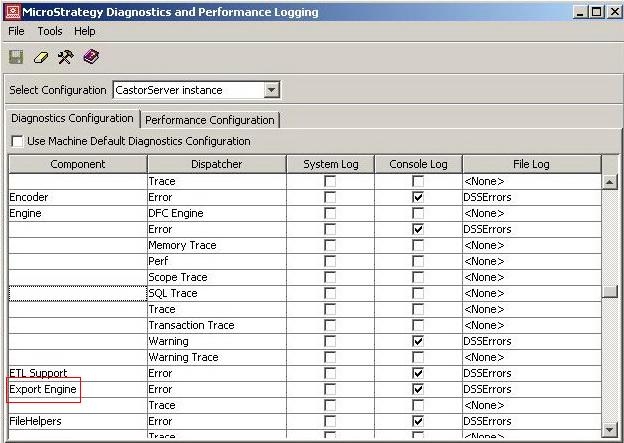
Notice the "Export Engine" component is now available as shown in the image below:
                          

ka04W000000OhI7QAK_0EM440000002HSj.jpeg


WARNING:
 Modifying registry values incorrectly may cause serious, system-wide problems that may require the re-installation of Microsoft Windows NT. Any edit of the registry is done at the user`s own risk. Since these are user-initiated changes, they are not covered by any Strategy warranty. If using Microsoft Windows NT, the user should backup the registry and/or update an Emergency Repair Disk (ERD) prior to alterations.


Comment

0 comments

Details

Knowledge Article

Published:

May 26, 2017

Last Updated:

May 26, 2017