EducationSoftwareStrategy.com
StrategyCommunity

Knowledge Base

Product

Community

Knowledge Base

TopicsBrowse ArticlesDeveloper Zone

Product

Download SoftwareProduct DocumentationSecurity Hub

Education

Tutorial VideosSolution GalleryEducation courses

Community

GuidelinesGrandmastersEvents
x_social-icon_white.svglinkedin_social-icon_white.svg
Strategy logoCommunity

© Strategy Inc. All Rights Reserved.

LegalTerms of UsePrivacy Policy
  1. Home
  2. Topics

KB33264: Users are able to remove a metric while the dependent derived metric is still present on the grid from Design mode in MicroStrategy Web 9.0.x


Community Admin

• Strategy


SYMPTOM:
When editing a report in Strategy Web 9.0.x, users are able to remove a metric dependent on a derived metric without any warning or error message. 
 
STEPS TO REPRODUCE:
Execute the following in Strategy Tutorial: 
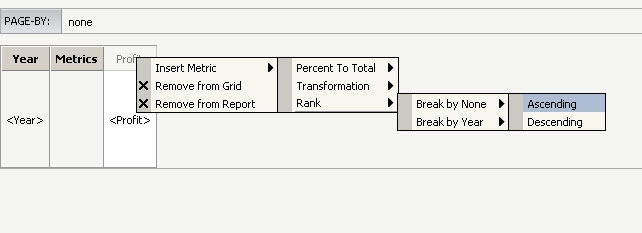
  • Create a new report with the Year attribute in the rows and the metric Profit in the columns.
  • Right mouse click on the metric Profit and select to insert a new metric -> Rank -> Break by None -> Ascending
     
ka04W000000OcUXQA0_0EM4400000027z5.jpeg
  • Save the report as R1. 
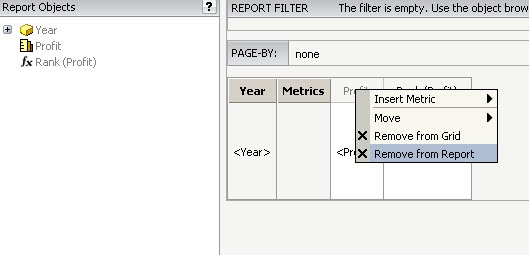
  • Edit the report in Design mode and select to remove the metric Profit from the report
     
ka04W000000OcUXQA0_0EM4400000027yw.jpeg
  • Notice that no warning or error messages were given.
  • Save the report. 
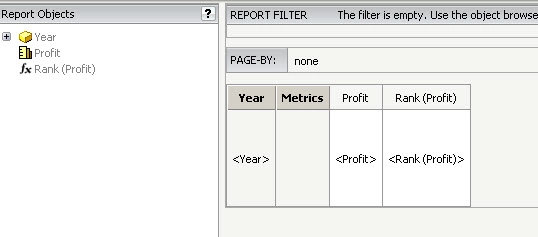
  • Edit the report again and notice that in Design Mode, the Profit metric is still present on the grid:
     
ka04W000000OcUXQA0_0EM4400000027yv.jpeg
  •  
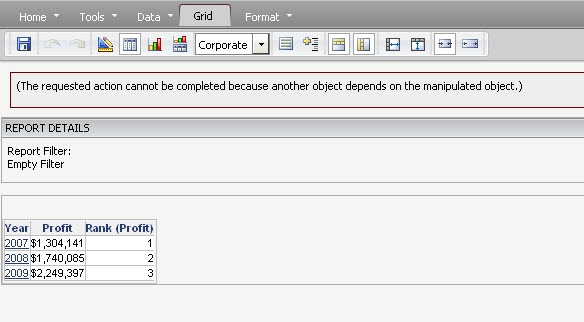
    Note: If the user executes the report and tries to remove the metric in Grid or Graph view mode, the following error message will be displayed as expected:
     
ka04W000000OcUXQA0_0EM4400000027z7.jpeg
  •  
     

    Sample Code/Error
    (The requested action cannot be completed because another object depends on the manipulated object.)

 
CAUSE:
This is a known issue in Strategy Web 9.0.x.
 
ACTION:
Contact Technical Support for an update regarding the issue


Comment

0 comments

Details

Knowledge Article

Published:

July 18, 2017

Last Updated:

July 18, 2017