EducationSoftwareStrategy.com
StrategyCommunity

Knowledge Base

Product

Community

Knowledge Base

TopicsBrowse ArticlesDeveloper Zone

Product

Download SoftwareProduct DocumentationSecurity Hub

Education

Tutorial VideosSolution GalleryEducation courses

Community

GuidelinesGrandmastersEvents
x_social-icon_white.svglinkedin_social-icon_white.svg
Strategy logoCommunity

© Strategy Inc. All Rights Reserved.

LegalTerms of UsePrivacy Policy
  1. Home
  2. Topics

KB33283: Two Consecutive Entries Are Logged in the Authentication Trace for Every Single Login Attempt in MicroStrategy Web


Community Admin

• Strategy


When using Authentication Server trace, users can see that two consecutive sets of entries are recorded for every single login attempt from MicroStrategy.

Description

When troubleshooting authentication issues, the Authentication Server trace can be enabled to record valuable information. When using this trace, users can see that two consecutive sets of entries are recorded for every single login attempt from Strategy Web as shown below.

Sample Code/Error


2010-03-18 12:47:25.053+09:00 Login using Standard Security with User=`user`

2010-03-18 12:47:25.053+09:00 Create user runtime

2010-03-18 12:47:25.099+09:00 Logout

2010-03-18 12:47:25.131+09:00 Login using Standard Security with User=`user`

2010-03-18 12:47:25.146+09:00 Create user runtime

2010-03-18 12:47:25.723+09:00 Logout

Why is this happening?

This behavior is expected whenever temporary user sessions are created. These temporary sessions are used when both of the following conditions are met:
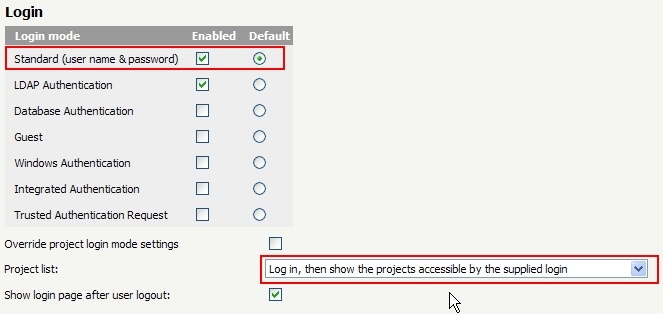
  • Users are connecting using standard authentication.
  • Login mode is set to "Log in, then show the projects accessible by the supplied login."
ka04W00000148CBQAY_0EM440000002Ar2.jpeg

Solution

The duplicated entries in the trace are expected and do not require special attention.


Comment

0 comments

Details

Knowledge Article

Published:

March 30, 2017

Last Updated:

March 30, 2017