EducationSoftwareStrategy.com
StrategyCommunity

Knowledge Base

Product

Community

Knowledge Base

TopicsBrowse ArticlesDeveloper Zone

Product

Download SoftwareProduct DocumentationSecurity Hub

Education

Tutorial VideosSolution GalleryEducation courses

Community

GuidelinesGrandmastersEvents
x_social-icon_white.svglinkedin_social-icon_white.svg
Strategy logoCommunity

© Strategy Inc. All Rights Reserved.

LegalTerms of UsePrivacy Policy
  1. Home
  2. Topics

KB33284: “This key is already associated with an element of this collection” error message appears when trying to save a group form in the Attribute Editor in MicroStrategy Developer 9.4.x-10.x.


Stefan Zepeda

Salesforce Solutions Architect • Strategy


This knowledge base article explains why “This key is already associated with an element of this collection” error message appears when trying to save a group form in the Attribute Editor in MicroStrategy Developer 9.4.x-10.x.

SUMMARY:
This knowledge base article explains why “This key is already associated with an element of this collection” error message appears when trying to save a group form in the Attribute Editor in Strategy Developer 9.4.x-10.x.
SYMPTOM:
When creating or editing an attribute with a grouped form mapped to a logical table, the following error message is displayed:


'This key is already associated with an element of this collection'.

 
STEP TO REPRODUCE:
Follow the steps below to reproduce this issue in the Strategy Tutorial project 9.4.x-10.x:

  • Create a logical table defined as ‘LU_DIST_CTR_LV’ using the columns from the 'LU_DIST_CTR' table using the Add button as shown in the image below:
ka02R000000kcONQAY_0EM440000002KKV.png
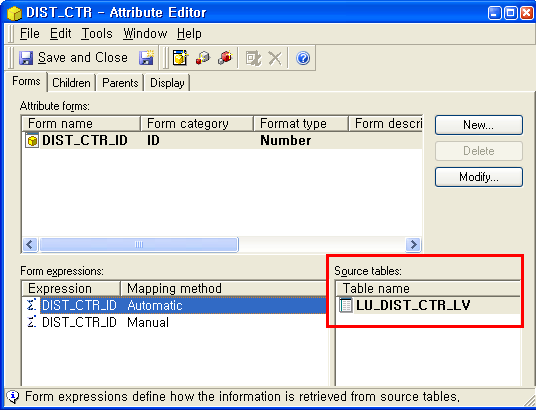
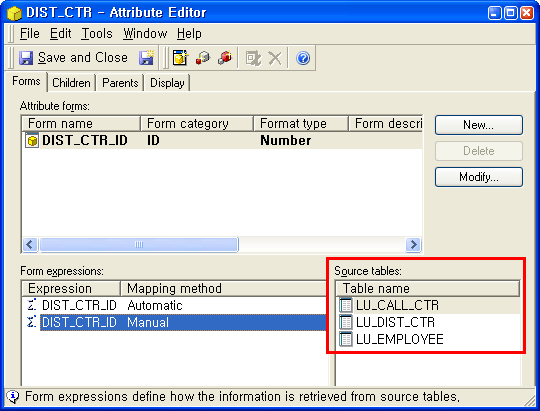
  • Create a new attribute with two expressions in the ID form. One expression should be pointing to the physical table while the other one points to the newly created logical table as shown in the following image:
ka02R000000kcONQAY_0EM440000002KKa.png
ka02R000000kcONQAY_0EM440000002KKf.png
  • Create a second attribute form and attempt to group the forms. The following warning is displayed:
ka02R000000kcONQAY_0EM440000002KKk.png
  • 
    The category selected for this form is already being used by another form in the current attribute. The only way to have multiple forms using the same form category is by creating a form group. Do you wish to create a form group?

  • ​Clicking on the "Yes" button causes the following error message to appear:
ka02R000000kcONQAY_0EM440000002KKp.png
  • 
    Unexpected error
    This key is already associated with an element of this collection

CAUSE: 
The column object created in the logical table was defined by typing the expression instead of mapping it to an existing column.
 
ACTION:
Define the column objects in the logical table by dragging existing columns from the physical source table from instead of using the 'Add' button as shown in the image below.
 

ka02R000000kcONQAY_0EM440000002E4o.png

 
By following this procedure, users will notice that the attribute can be defined using only one expression because the columns are not duplicated. Attribute forms can be then grouped correctly as shown in the image below:
 

ka02R000000kcONQAY_0EM440000002E4l.png

For more information about Logical Tables (Logical View), please refer to the following Technical Notes: 
TN: 12000 (KB5300-800-0666): After creating a column in a logical table, automatic mapping does not occur for attributes referencing columns with the same name in Strategy 9.x  
TN: 16858 (KB5700-8X-2746): How to create logical tables without creating duplicate columns objects in Strategy Desktop 9.


Comment

0 comments

Details

Knowledge Article

Published:

April 28, 2017

Last Updated:

April 28, 2017