In order to successfully configure the system to use integrated authentication there are four types of users that need to be created in the Active Directory.
User for the Strategy Intelligence Server service
User for the Strategy Web Server Service
User for the Data Warehouse Service
End users that will be using Strategy
User for the Strategy Intelligence Server service
For Instructions on how to create the user in Active Directory for the Strategy Intelligence Server Service please refer to the following Technical Note:
KB19110: How to configure Strategy Intelligence Server Universal 9.x Kerberos (Integrated) authentication on Unix/Linux operating systems.
User for the Strategy Web Server Service
HTTP/machinename

HTTP/Fully.Qualified.Domain.Name
Note: It is very important to have the machine name in lower case, when defining the Service Principal Name in the active directory, (and the Domain name in Upper case if adding the domain name).
This can either be done using the command line command: setspn -A or using the adsiedit.msc Microsoft GUI tool
For this technical note we created a user called Yellow Tomcat
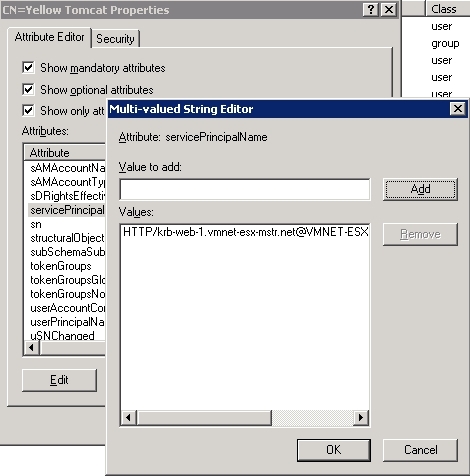
Notice how the Service Principal name is set to HTTP/krb-web-1.vmnet-esx-mstr.net@VMNET-ESX-MSTR.NET
Also set the userPrincipal name property to the same value HTTP/krb-web-1.vmnet-esx-mstr.net@VMNET-ESX-MSTR.NET
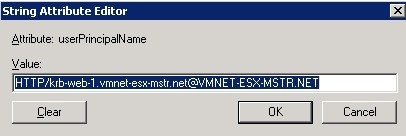
(For all purposes integrated authentication relies in the uniqueness of the service principal name to identify the available services in th active domain except for when executing KINIT whose call will return the value stored under the User Principal Name)
Third Party Software Installation WARNING
The third-party product(s) discussed in this technical note is manufactured by vendors independent of Strategy. Strategy makes no warranty, express, implied or otherwise, regarding this product, including its performance or reliability.
