SYMPTOM:
When a user exports a report or document to PDF the browser prompts him to save the file "Main.aspx".
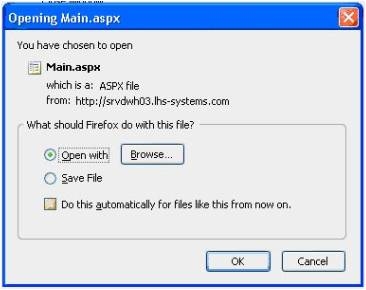
CAUSE:
This is a known issue in Strategy Web 9.0.1. and 10.x
ACTION:
Please contact Strategy technical for an update on this issue.
WORKAROUND:
The user can build a plug-in to modify the behavior of the transform: "PDFTransform" and overwrite the style: "PDFStyle" with the custom class.
package com.Strategy.sdk;
import java.util.Stack;
import com.Strategy.web.app.BrowserSettings;
import com.Strategy.web.app.transforms.PDFTransform;
import com.Strategy.web.app.utils.ExportBeanHelper;
import com.Strategy.web.beans.MarkupOutput;
import com.Strategy.web.beans.ReportBean;
import com.Strategy.web.beans.WebBeanException;
import com.Strategy.web.beans.WebComponent;
public class PDFTransformCustom extends PDFTransform{
@Override
public void transformForRequestSuccessful(MarkupOutput mo) {
ReportBean _rb = getReportBean(_bean);
String fileName = "export.pdf";
try {
fileName = ExportBeanHelper.getDisplayableReportName(_rb.getObjectName(), true) + ".pdf";
} catch (WebBeanException e) {
e.printStackTrace();
}
boolean isIE = getAppContext().getBrowserSettings().getBrowserType() == BrowserSettings.BROWSER_TYPE_IE;
String contentDisHeader = "";
if(isIE){
contentDisHeader += "filename=" + fileName + ";";
}else{
contentDisHeader += "filename*=" + fileName + ";";
}
getContainerServices().setHeaderValue("Content-Disposition", contentDisHeader);
mo.addHeader("Content-Disposition", contentDisHeader);
super.transformForRequestSuccessful(mo);
}
private ReportBean getReportBean(WebComponent _bean) {
if(_bean instanceof ReportBean){
return (ReportBean)_bean;
}else{
Stack<WebComponent> stack = new Stack<WebComponent>();
stack.push(_bean);
WebComponent _beanTmp;
while((_beanTmp = stack.pop()) != null){
for(int i = 0; i < _beanTmp.getChildCount(); i++){
if(_bean.getChild(i) instanceof ReportBean){
return (ReportBean)_beanTmp.getChild(i);
}else{
stack.push(_beanTmp.getChild(i));
}
}
}
}
return null;
}
}
CUSTOMIZATION WARNING:
This customization is provided as a convenience to Strategy users and is only directly applicable to the version stated. While this code may apply to other releases directly, Strategy Technical Support makes no guarantees that the code provided will apply to any future or previous builds. In the event of a code change in future builds, Strategy Technical Support makes no guarantee that an updated version of this particular customization will be provided. In the event of a code change in future builds, Strategy may not be able to provide additional code on this matter even though this customization is provided at this time for this specific build. For enhancements to this customization or to incorporate similar functionality into other versions, contact your Account Executive to inquire about Strategy Consulting assistance.
000005420
