EducationSoftwareStrategy.com
StrategyCommunity

Knowledge Base

Product

Community

Knowledge Base

TopicsBrowse ArticlesDeveloper Zone

Product

Download SoftwareProduct DocumentationSecurity Hub

Education

Tutorial VideosSolution GalleryEducation courses

Community

GuidelinesGrandmastersEvents
x_social-icon_white.svglinkedin_social-icon_white.svg
Strategy logoCommunity

© Strategy Inc. All Rights Reserved.

LegalTerms of UsePrivacy Policy
  1. Home
  2. Topics

KB33312: "LIST EXPRESSION FOR METRIC" command does not return the complete expression of a metric in MicroStrategy Command Manager 9.0.0 - 9.0.1


Community Admin

• Strategy


"LIST EXPRESSION FOR METRIC" command does not return the complete expression of a metric in MicroStrategy Command Manager 9.0.0 - 9.0.1

SYMPTOM:
 
"LIST EXPRESSION FOR METRIC" command returns the metric formula, instead of the complete expression of a metric in Strategy Command Manager 9.0.X
 
STEPS TO REPRODUCE:
 

  1. Suppose the following metric with expression: Sum(Revenue){~,Year}   
ka04W000000OhZCQA0_0EM440000002Aqs.jpeg


CAUSE:
 
This is a known issue for Strategy Command Manager 9.0.X. 
 
ACTION:
 
This issue is fixed in Strategy Command Manager 9.2.1. Upgrade to this version to take advantage of the fix.
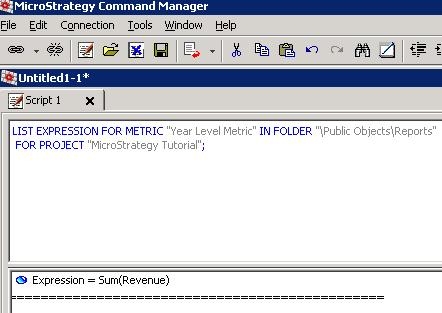


  • Execute the following script in Strategy Command Manager 9.0.0 or 9.0.1: 

    Sql

     
    LIST EXPRESSION FOR METRIC "Year Level Metric" IN FOLDER "\Public Objects\Reports" FOR PROJECT "Strategy Tutorial";
  • Notice that only the formula is returned while the complete expression with levels and filters was expected. The results of the command are shown in the screenshot below:
     
ka04W000000OhZCQA0_0EM440000002Aqe.jpeg

Comment

0 comments

Details

Knowledge Article

Published:

May 14, 2017

Last Updated:

May 14, 2017