EducationSoftwareStrategy.com
StrategyCommunity

Knowledge Base

Product

Community

Knowledge Base

TopicsBrowse ArticlesDeveloper Zone

Product

Download SoftwareProduct DocumentationSecurity Hub

Education

Tutorial VideosSolution GalleryEducation courses

Community

GuidelinesGrandmastersEvents
x_social-icon_white.svglinkedin_social-icon_white.svg
Strategy logoCommunity

© Strategy Inc. All Rights Reserved.

LegalTerms of UsePrivacy Policy
  1. Home
  2. Topics

KB33313: The time to trigger of a schedule appears shifted from the original value when editing a schedule object in MicroStrategy Developer


Stefan Zepeda

Salesforce Solutions Architect • Strategy


The trigger time of a schedule appears shifted by a few minutes from the originally value when editing a schedule object in MicroStrategy Developer. Consider the screenshot below in which the time to trigger is shown as '12:59:00 AM' even when the it was set to '01:00:00 AM'  when the schedule was originally created

SYMPTOM:
The trigger time of a schedule appears shifted by a few minutes from the originally value when editing a schedule object in Strategy Developer. Consider the screenshot below in which the time to trigger is shown as '12:59:00 AM' even when the it was set to '01:00:00 AM'  when the schedule was originally created.
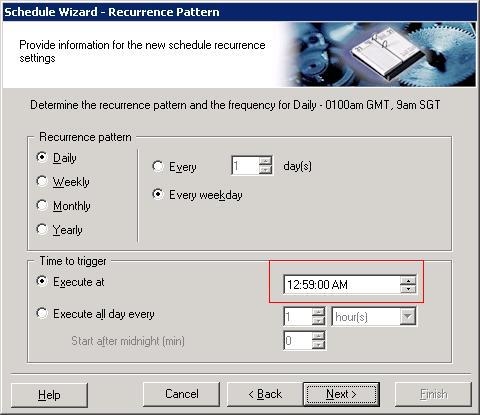
 

ka02R000000kZk1QAE_0EM440000002E4j.jpeg

 
CAUSE:
This issue can be observed when  there is  a difference in the system time between the  Intelligence Server and the Developer machine.
 
ACTION:
Make sure that the system time in the client machine where Developer is installed matches the time in the Intelligence Server machine.


Comment

0 comments

Details

Knowledge Article

Published:

June 8, 2017

Last Updated:

June 8, 2017