EducationSoftwareStrategy.com
StrategyCommunity

Knowledge Base

Product

Community

Knowledge Base

TopicsBrowse ArticlesDeveloper Zone

Product

Download SoftwareProduct DocumentationSecurity Hub

Education

Tutorial VideosSolution GalleryEducation courses

Community

GuidelinesGrandmastersEvents
x_social-icon_white.svglinkedin_social-icon_white.svg
Strategy logoCommunity

© Strategy Inc. All Rights Reserved.

LegalTerms of UsePrivacy Policy
  1. Home
  2. Topics

KB33315: How to disable exporting and printing at the individual report level in MicroStrategy Web?


Community Admin

• Strategy


How to disable exporting and printing at the individual report level in MicroStrategy Web?

Due to security concerns, users may want to disable exporting functionality only for certain reports that may contain private information. Starting from Strategy Web 9.x, this can be done at the report level. Follow the instructions below to disable the exporting functionality for a specific report:
  • Run the report that user wants to disable exporting for.
  • Go to the Tools menu and select Report Options.
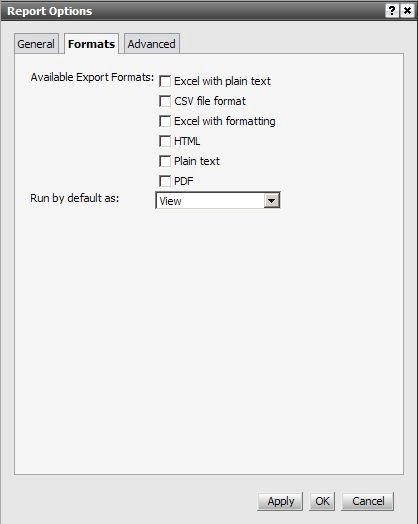
  • Turn off all exporting options as shown below:
ka04W00000148b2QAA_0EM4400000027zJ.jpeg
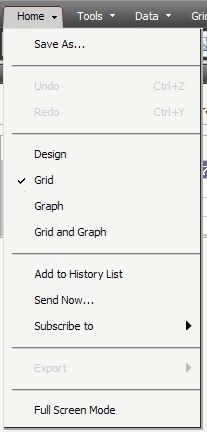
  • Export option is disabled from the menu:
ka04W00000148b2QAA_0EM4400000027zF.jpeg

Comment

0 comments

Details

Knowledge Article

Published:

June 6, 2017

Last Updated:

June 6, 2017