EducationSoftwareStrategy.com
StrategyCommunity

Knowledge Base

Product

Community

Knowledge Base

TopicsBrowse ArticlesDeveloper Zone

Product

Download SoftwareProduct DocumentationSecurity Hub

Education

Tutorial VideosSolution GalleryEducation courses

Community

GuidelinesGrandmastersEvents
x_social-icon_white.svglinkedin_social-icon_white.svg
Strategy logoCommunity

© Strategy Inc. All Rights Reserved.

LegalTerms of UsePrivacy Policy
  1. Home
  2. Topics

KB33347: "Fit to 1 pages wide by 1 pages tall" in page setup does not function when reports are extremely wide. Several columns do not print on the page when printing from MicroStrategy Developer 9x.


Stefan Zepeda

Salesforce Solutions Architect • Strategy


"Fit to 1 pages wide by 1 pages tall" in page setup does not function when reports are extremely wide. Several columns do not print on the page when printing from MicroStrategy Developer 9x.

SYMPTOM:
Despite the "Fit to 1 pages wide by 1 pages tall" option being selected in the print setup, several columns still run off the page.
 
CAUSE:
This is a known issue in Strategy 9.x
 
WORKAROUND:
There are two possible workarounds:
 
The first option is to print the report from Strategy Web.
 
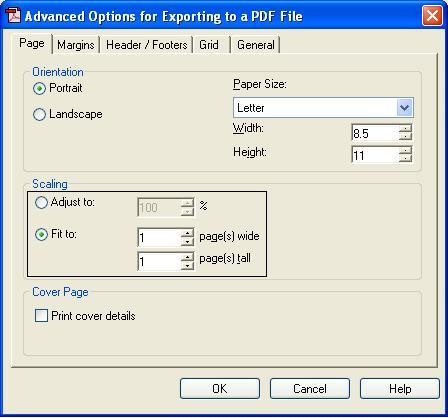
The second option requires making the following changes to PDF export options, exporting to PDF, and printing it from there.
Please use the following steps to make changes to the export options:
 

  • Open the report.
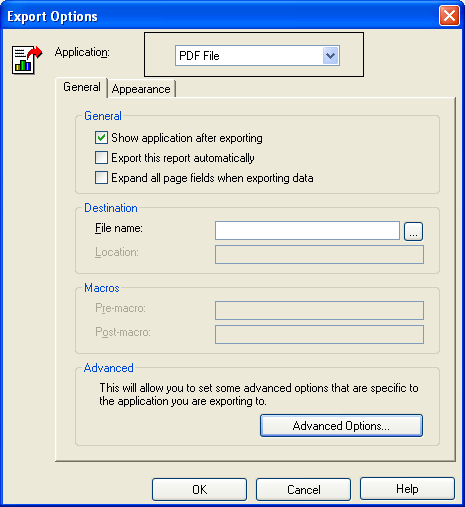
  • Open the data menu, and select export options.
  • For Application, select PDF.
     
ka02R000000kYSyQAM_0EM440000002Dz5.png
  • Click Advanced options.
  • Under scaling select fit to 1 page by 1 page.
     
ka02R000000kYSyQAM_0EM440000002Dz4.jpeg
  • Export the document to PDF, and print it there.


Comment

0 comments

Details

Knowledge Article

Published:

June 8, 2017

Last Updated:

June 8, 2017