EducationSoftwareStrategy.com
StrategyCommunity

Knowledge Base

Product

Community

Knowledge Base

TopicsBrowse ArticlesDeveloper Zone

Product

Download SoftwareProduct DocumentationSecurity Hub

Education

Tutorial VideosSolution GalleryEducation courses

Community

GuidelinesGrandmastersEvents
x_social-icon_white.svglinkedin_social-icon_white.svg
Strategy logoCommunity

© Strategy Inc. All Rights Reserved.

LegalTerms of UsePrivacy Policy
  1. Home
  2. Topics

KB33352: Metric Headers do not repeat on the following pages when a grid begins on the last line of a page when exported to PDF.


Stefan Zepeda

Salesforce Solutions Architect • Strategy


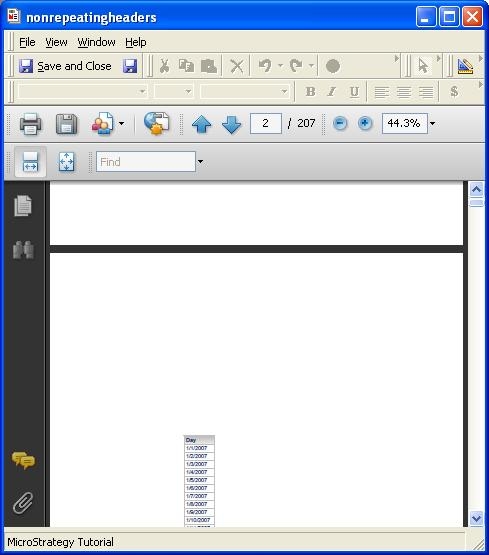
The detail header section of a document contains several grids separated by sections.  Each section contains a grid.   When exported to PDF, one of the grids may begin on the last possible line of a page.  When this occurs, the column headers for that grid do not repeat on subsequent pages

SYMPTOM:
The detail header section of a document contains several grids separated by sections.  Each section contains a grid.   When exported to PDF, one of the grids may begin on the last possible line of a page.  When this occurs, the column headers for that grid do not repeat on subsequent pages, as observed in the following image:
 

ka02R000000kYCFQA2_0EM440000002Dz8.jpeg

 
CAUSE:
This is a known issue in Strategy 9.0.1
 
WORKAROUND:
In order to ensure that the column headers do not separate from the rest of the grid, the 'Keep Together' option can be used when exporting to PDF.  Use the following procedure to enable 'Keep Together':

  • Right click the section where the grid appears
  • Select properties
  • Select the Layout tab
  • Check 'Keep Together' under PDF, as shown in the following image:
     
ka02R000000kYCFQA2_0EM440000002Dyt.jpeg
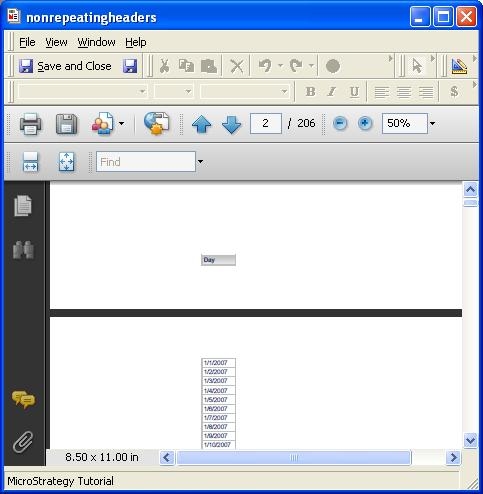
  • The grid will now begin on the next page:
     
ka02R000000kYCFQA2_0EM440000002Dyr.jpeg


Comment

0 comments

Details

Knowledge Article

Published:

June 9, 2017

Last Updated:

June 9, 2017