EducationSoftwareStrategy.com
StrategyCommunity

Knowledge Base

Product

Community

Knowledge Base

TopicsBrowse ArticlesDeveloper Zone

Product

Download SoftwareProduct DocumentationSecurity Hub

Education

Tutorial VideosSolution GalleryEducation courses

Community

GuidelinesGrandmastersEvents
x_social-icon_white.svglinkedin_social-icon_white.svg
Strategy logoCommunity

© Strategy Inc. All Rights Reserved.

LegalTerms of UsePrivacy Policy
  1. Home
  2. Topics

KB33363: Metric formatting is not applied in Dual-Axis graphs in MicroStrategy 9.4.1 and 10.x


Stefan Zepeda

Salesforce Solutions Architect • Strategy


Metric formatting is not applied in Dual-Axis graphs in MicroStrategy 9.4.1 and 10.x

SYMPTOM
When creating a report in Strategy and the desired result is to be displayed in a dual-axis graph, modifying one of the metric values can result in display inconsistency from grid to graph.  Having the metric with modified values displays correctly in both grid and graph view if the metric is the only metric on the report.  However, adding another metric to the graph and keeping the default value formatting can cause the grid view to display the modified metric values as the default.
 
STEPS TO REPRODUCE
Follow these steps to reproduce the issue in Strategy Tutorial.
  • Create a report with Tutorial Data and have Region in the rows, Revenue and Profit in the columns.
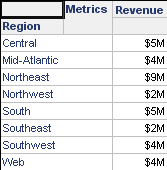
  • Run the report and set the Revenue values formatting to custom: "$"#,0,,"M" (i.e to display $4,000,000 as $4M).
     
ka02R000000kYAQQA2_0EM440000002Dyw.png
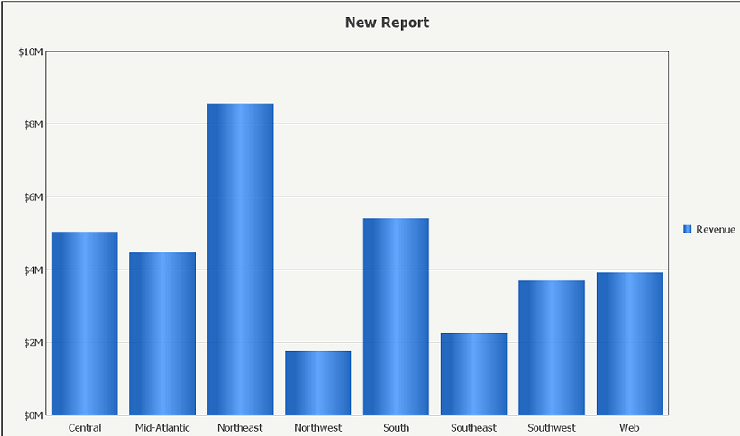
  • Switch to Graph view and select Vertical Bar: Clustered graph and notice how the formatting holds.
     
ka02R000000kYAQQA2_0EM440000002Dz0.png
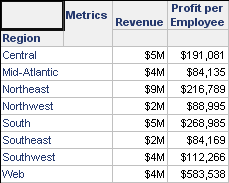
  • Add the Profit by Employee metric in the columns but leave the formatting values to their default and view the results in  grid. 
     
ka02R000000kYAQQA2_0EM440000002Dyu.png
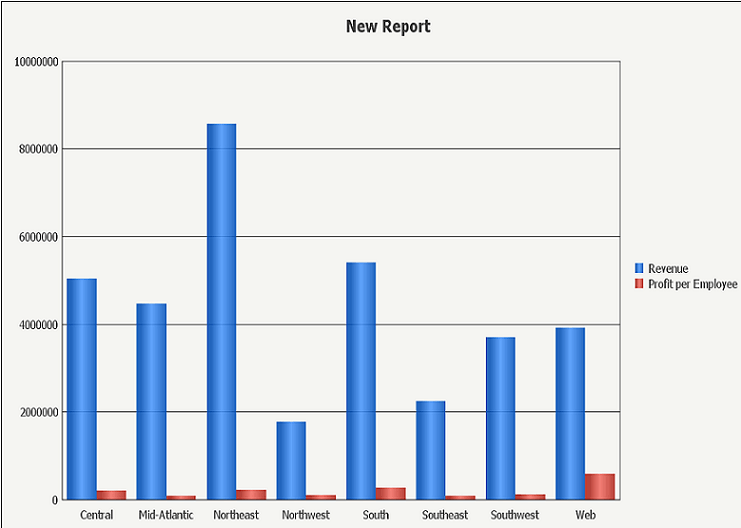
  • View the results in Graph view and notice how the values go back to the default format.
     
ka02R000000kYAQQA2_0EM440000002Dyy.png

 
CAUSE
This is a known issue and has been logged with Technology.
 
ACTION
Contact Strategy Technical Support for an update on this issue.


Comment

0 comments

Details

Knowledge Article

Published:

June 9, 2017

Last Updated:

June 9, 2017