EducationSoftwareStrategy.com
StrategyCommunity

Knowledge Base

Product

Community

Knowledge Base

TopicsBrowse ArticlesDeveloper Zone

Product

Download SoftwareProduct DocumentationSecurity Hub

Education

Tutorial VideosSolution GalleryEducation courses

Community

GuidelinesGrandmastersEvents
x_social-icon_white.svglinkedin_social-icon_white.svg
Strategy logoCommunity

© Strategy Inc. All Rights Reserved.

LegalTerms of UsePrivacy Policy
  1. Home
  2. Topics

KB33384: Date format in report is inconsistent between Narrowcast Server and Developer when locale in Windows is set to "English (Australia)" in MicroStrategy Narrowcast Server 9.4.x-10.x.


Stefan Zepeda

Salesforce Solutions Architect • Strategy


This knowledge base article explains why date format in report is inconsistent between Narrowcast Server and Developer when locale in Windows is set to "English (Australia)" in MicroStrategy Narrowcast Server 9.4.x-10.x.

SYMPTOM:
Date format in report is inconsistent between Narrowcast Server and Developer when locale in Windows  is set to "English (Australia)" in Strategy Narrowcast Server 9.4.x-10.x:
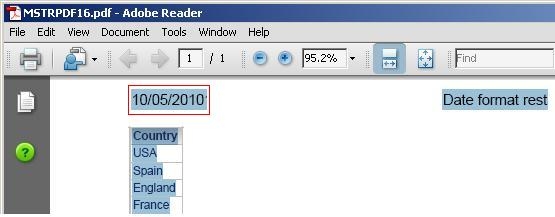
ka02R000000kbTXQAY_0EM440000002AqT.jpeg

 
STEPS TO REPRODUCE:

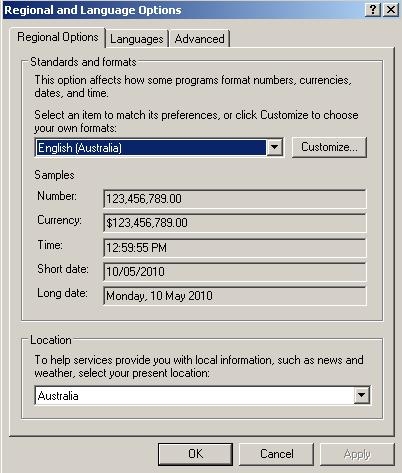
  • In a Windows machine, go to  Control Panel > Regional and Language Options and set the Standards and formats setting to  English (Australia) as shown below, notice that the data format is DD/MM/YYYY:
     
ka02R000000kbTXQAY_0EM440000002AqF.jpeg
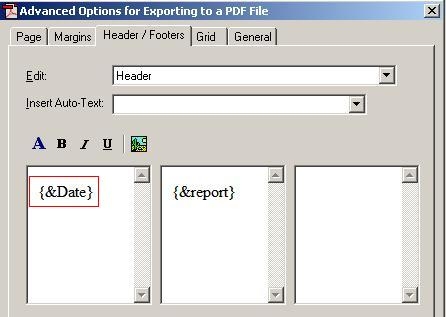
  • In Strategy Developer, create a report  and go to Data > Export Options and select Advanced Option for Exporting to a PDF file. Under Header/ Footers tab,  insert a Date Auto-Text  as shown in the image below:
     
ka02R000000kbTXQAY_0EM440000002AqI.jpeg
  • When the report is exported In Strategy Developer, export the report to PDF, notice that the date format is DD/MM/YYYY as shown below, same as that in Control Panel, Regional and Language Options:
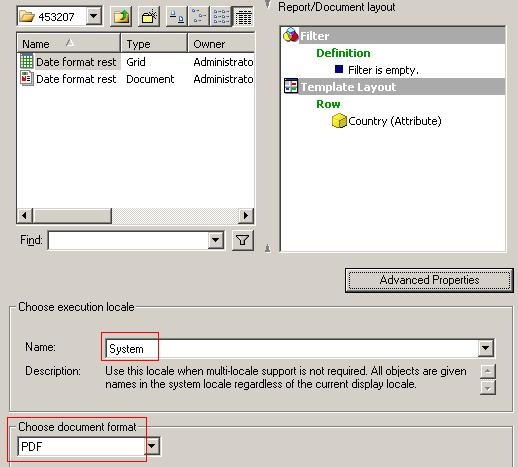
  • In Narrowcast Administrator, create a service to deliver the report created in step1 as PDF to a file location.  Select "System" as the execution locale as shown below:
ka02R000000kbTXQAY_0EM440000002AqD.jpeg


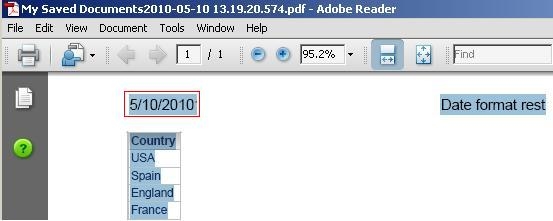
  • Open the PDF report exported by Narrowcast Server in the file location, notice that the date format is changed to MM/DD/YYYY, as shown below:
ka02R000000kbTXQAY_0EM440000002AqW.jpeg

CAUSE:
This behavior is by design.
 
ACTION:
Follow the steps below to get content formatted on a language that is not included out of the box:

  1. Using Desktop, go to Administration > Configuration Managers > Languages.
  2. Right click on the right panel > New > Language > select English (Australia).
  3. On the Narrowcast Server Console, specify this locale on the Information Source. Go to > Administration > Information Source Modules, then Edit the corresponding Information Source > click on "Define" to open the Information Source Wizard > click Next to reach the "Default Language" window > select English (Australia) for the Number and Date formatting locale > Finish > Ok.
  4. Export the report to PDF via Narrowcast Server, and verify the date format.

Comment

0 comments

Details

Knowledge Article

Published:

June 22, 2017

Last Updated:

June 22, 2017