EducationSoftwareStrategy.com
StrategyCommunity

Knowledge Base

Product

Community

Knowledge Base

TopicsBrowse ArticlesDeveloper Zone

Product

Download SoftwareProduct DocumentationSecurity Hub

Education

Tutorial VideosSolution GalleryEducation courses

Community

GuidelinesGrandmastersEvents
x_social-icon_white.svglinkedin_social-icon_white.svg
Strategy logoCommunity

© Strategy Inc. All Rights Reserved.

LegalTerms of UsePrivacy Policy
  1. Home
  2. Topics

KB33415: Users and groups display different names across interface languages after being renamed in MicroStrategy Developer 9.3.x.


Benjamin Reyes

Vice President, Product Management • MicroStrategy


After changing the name of users and groups in MicroStrategy Developer 9.3.x, different object names are displayed across interface languages

Description

After changing the name of users and groups in Strategy Developer 9.3.x, different object names are displayed across interface languages
 

Steps to Reproduce

Follow steps below to reproduce this issue in Strategy Tutorial.
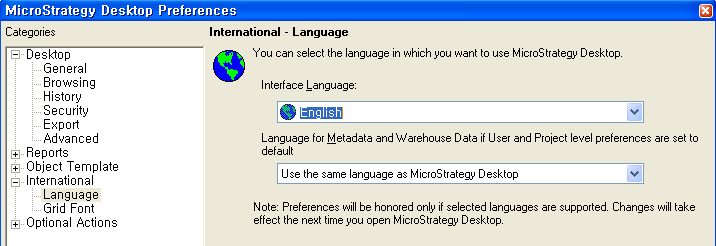
  • Configure Strategy Desktop to use 'English' as the interface language as shown below:
ka02R000000g2qhQAA_0EM440000002E4G.png
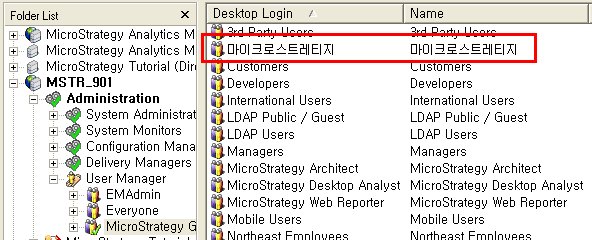
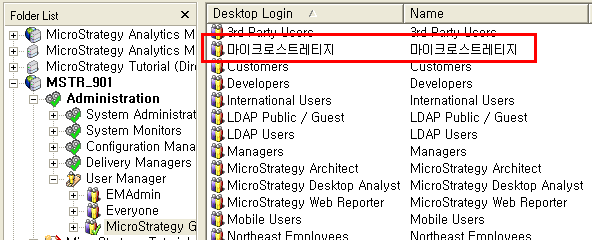
  • Create a user with a Korean login as ‘마이크로스트레티지’ as shown in the image below:
ka02R000000g2qhQAA_0EM440000002E4R.png
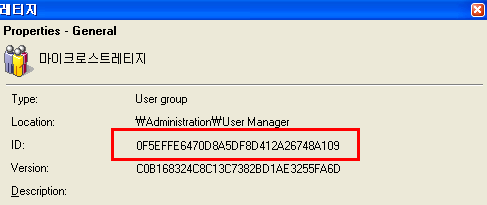
  • Confirm the object ID for the recently created user in the properties window as shown below:
ka02R000000g2qhQAA_0EM440000002E4S.png
  • Connect to the same metadata using a Strategy Desktop client configured to display 'Korean' as the interface language as shown in the image below: 
     
     
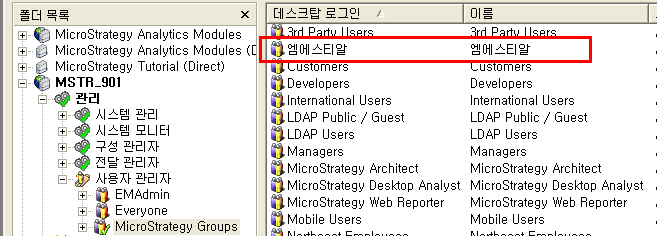
  • Rename the user created in step 2. For this example, the Korean name ‘엠에스티알’ is used as shown below:
ka02R000000g2qhQAA_0EM440000002E4K.png
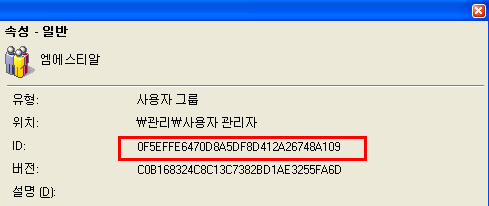
  • Confirm that the change was applied under the object with the same object ID as illustrated below:
ka02R000000g2qhQAA_0EM440000002E4P.png
  • Re-connect to the project from the Strategy Desktop machine using the English interface language. Notice that the original name for the user is shown as below:
ka02R000000g2qhQAA_0EM440000002E4I.png


Why is this happening?

This is working as designed with Metadata Internationalization feature in Strategy 9.3.x.
 

Solution

Follow the steps below to display the same object's name across interface languages in Strategy Developer 9.3.x.
ka02R000000g2qhQAA_0EM440000002E4E.png


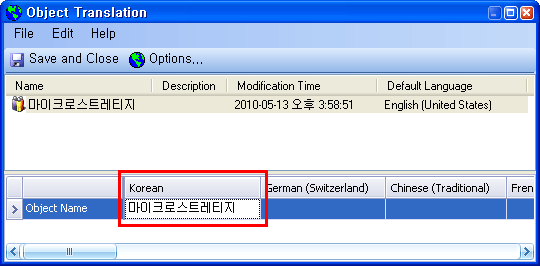
  • Right mouse click on the user  ‘마이크로스트레티지’ in the English interface version of Strategy Developer 9.3.x. and select 'Translate'
  •  Modify  the value under the ‘Korean’ field to the expected name  as shown below:
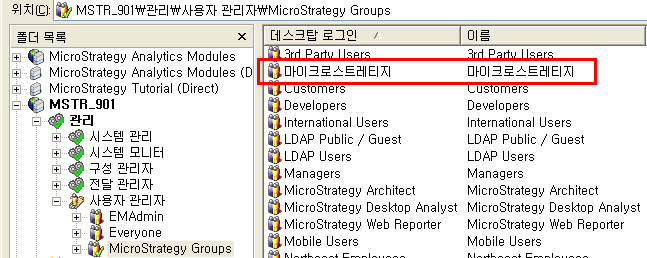
  • After this change is performed, users running the Korean version of Strategy Developer 9.3.x will see the correct object name as shown below:
     
ka02R000000g2qhQAA_0EM440000002E4c.png


Comment

0 comments

Details

Knowledge Article

Published:

May 12, 2017

Last Updated:

September 20, 2019