EducationSoftwareStrategy.com
StrategyCommunity

Knowledge Base

Product

Community

Knowledge Base

TopicsBrowse ArticlesDeveloper Zone

Product

Download SoftwareProduct DocumentationSecurity Hub

Education

Tutorial VideosSolution GalleryEducation courses

Community

GuidelinesGrandmastersEvents
x_social-icon_white.svglinkedin_social-icon_white.svg
Strategy logoCommunity

© Strategy Inc. All Rights Reserved.

LegalTerms of UsePrivacy Policy
  1. Home
  2. Topics

KB33417: How to run Master Health Agent or Health Agent as an application on UNIX/Linux operating systems in MicroStrategy Health Center 9.x and 10.x


Community Admin

• Strategy


How to run Master Health Agent or Health Agent as an application on UNIX/Linux operating systems

In Strategy Health Center 9.x and 10.x, the user has an option to run Master Health Agent (MHA) or Health Agent (HA) on UNIX/Linux operating systems. If the user chooses to run MHA or HA as a daemon, the user who configures them requires to be the root account.
 
This document explains how to run MHA or HA as an application by the steps below:
 
Note: if the user account which runs MHA/HA as an application does not have root access, when MHA/HA collects logs from folders which only the root account has access to, MHA/HA will fail retrieving logs from those folders.
 
To configure Master Health Agent (MHA) as an application:

  • When configuring MHA in the Health Center Configuration Wizard, in the Connection Parameters window, leave the  "Configure daemon" option blank.  
     
ka04W000000OdVhQAK_0EM440000002Apz.gif
  • After finishing the Configuration Wizard, from the terminal, run the script below in the /bin folder:


    ./mstrsuppappsn


ka04W000000OdVhQAK_0EM440000002AqB.gif

To configure Health Agent (HA) as an application:

  • When configuring HA in the Health Center Configuration Wizard, in the Connection Parameters window, leave the  "Configure daemon" option blank.   
     
ka04W000000OdVhQAK_0EM440000002Aq3.gif
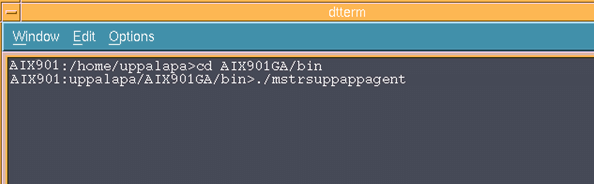
  • After finishing the Configuration Wizard, from the terminal, run the script below in the /bin folder:


    ./mstrsuppappagent


ka04W000000OdVhQAK_0EM440000002Apx.gif

To terminate the MHA or HA application, the user can simply use the "kill" command or use "ctrl + c" to leave the console.


Comment

0 comments

Details

Knowledge Article

Published:

April 13, 2017

Last Updated:

April 13, 2017