DataTransmitter Trace is useful in troubleshooting Strategy Bulk Export issues. It can be found in Strategy Diagnostics and Performance Logging tool as seen below:
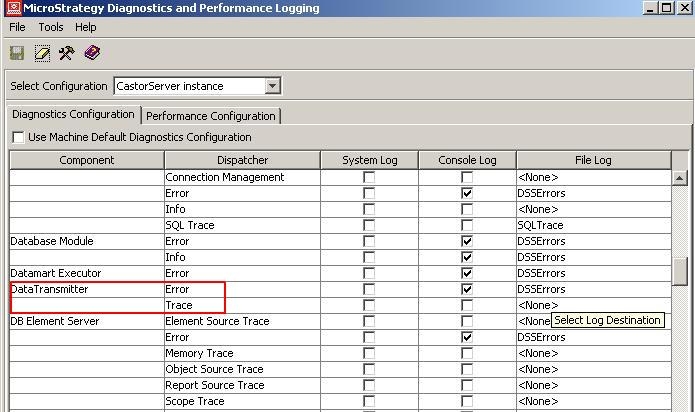
Note: Strategy Intelligence Server should be restarted to activate DataTransmitter Trace.
Strategy Bulk Export feature enables users to retrieve result sets from large datasets without having to load the entire datasets in memory.
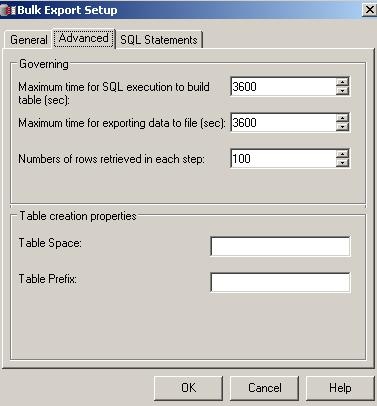
During Bulk Export, data is written incrementally to a user defined file location based on "Number of rows retrieved in each step" setting as seen below. The default value for this setting is 500 rows but in the example below, a value of 100 is used.
This setting controls the number of database rows that the bulk export retrieves at a time. The job remains active until all the bulk export chunks (database rows) are written to file.
t
When the bulk export job starts, the following entry is added to the DataTransmitter Trace:
2010-05-24 11:28:02.250-05:00 Initializing transmitter
For each bulk export chunk retrieved from the database, the following set of rows is added to the DataTrannsmitter Trace:
2010-05-24 11:28:02.282-05:00 Applying format properties
2010-05-24 11:28:02.328-05:00 Formatting content
2010-05-24 11:28:02.360-05:00 Sending email
2010-05-24 11:28:02.422-05:00 Getting address statuses
