When users try to connect to Strategy Web being hosted in Internet Information Services (IIS) Web server machine, the user is prompted for credentials.
The user sees the Microsoft Windows Network login pop up
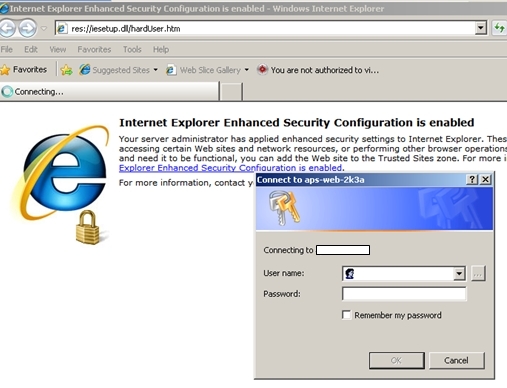
The following article from Microsoft's knowledge base explains when the browser window will request for credentials to the end user
http://support.microsoft.com/kb/258063
An extract from the above article:
Internet Explorer must consider the requested URL to be on the intranet (local). If the computer name portion of the requested URL contains periods (such as http://www.microsoft.com and http://10.0.0.1), Internet Explorer assumes that the requested address exists on the Internet and does not pass any credentials automatically.
Addresses without periods (such as http://webserver) are considered to be on the intranet (local); Internet Explorer passes credentials automatically. The only exception is addresses included in the Intranet zone in Internet Explorer.
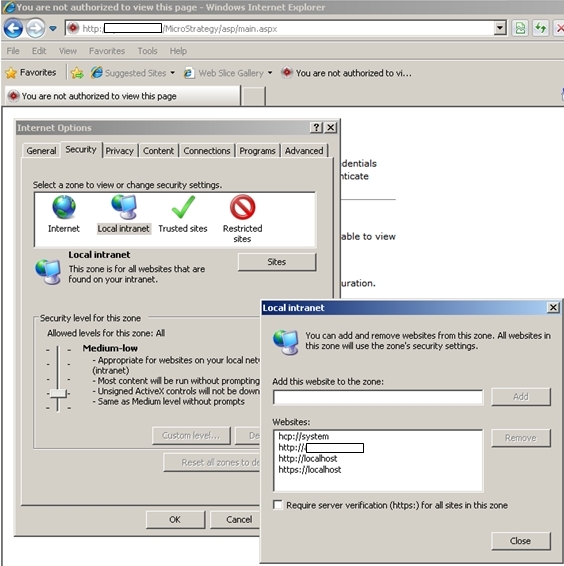
To "workaround" this issue, go to Internet tools, security and add the server name to the local group
Third Party Software Installation WARNING
The third-party product(s) discussed in this technical note is manufactured by vendors independent of Strategy. Strategy makes no warranty, express, implied or otherwise, regarding this product, including its performance or reliability.
