EducationSoftwareStrategy.com
StrategyCommunity

Knowledge Base

Product

Community

Knowledge Base

TopicsBrowse ArticlesDeveloper Zone

Product

Download SoftwareProduct DocumentationSecurity Hub

Education

Tutorial VideosSolution GalleryEducation courses

Community

GuidelinesGrandmastersEvents
x_social-icon_white.svglinkedin_social-icon_white.svg
Strategy logoCommunity

© Strategy Inc. All Rights Reserved.

LegalTerms of UsePrivacy Policy
  1. Home
  2. Topics

KB33593: How to see the error codes and descriptions for executed jobs using MicroStrategy Enterprise Manager 9.4.x - 10.x


Community Admin

• Strategy


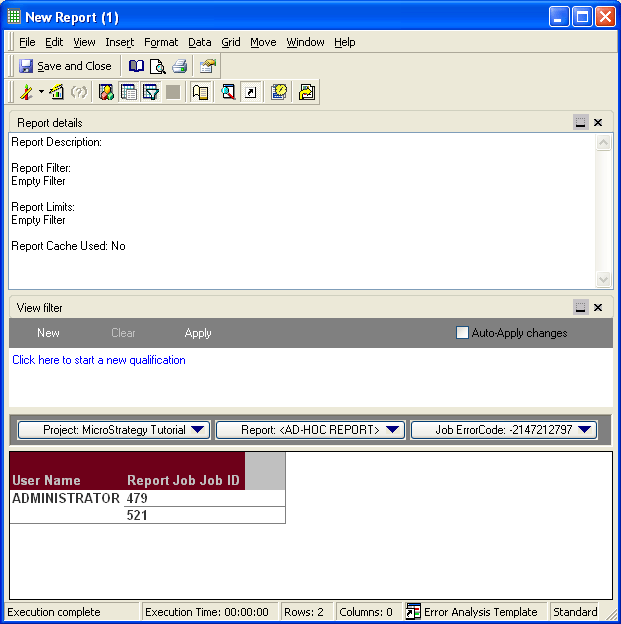
In the Strategy Enterprise Manager project there is a report template called 'Error Analysis Template' in 'Public Objects/Templates'. This template layout shows information on the error codes returned by executed jobs:
 

ka04W000000Oh8EQAS_0EM440000002Apm.png


ka04W000000Oh8EQAS_0EM440000002Apu.png

 
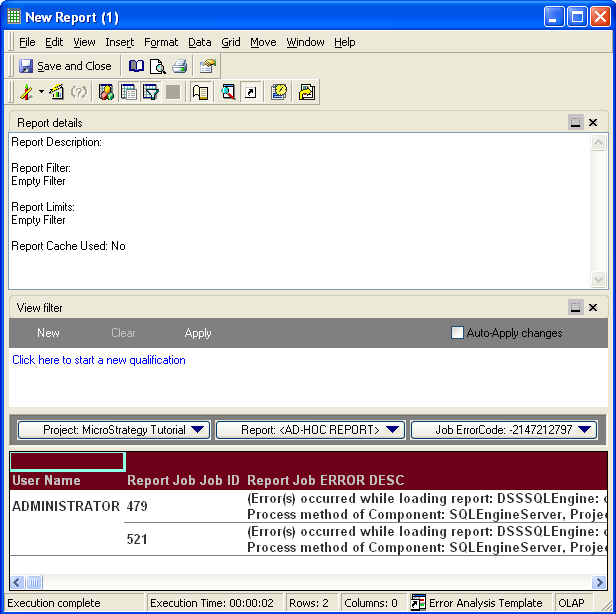
The template on its own only shows the job error codes, which may not be helpful in determining why a job failed. The 'ERROR DESC' form on the 'Report Job' attribute can be added to the template to fetch the detailed error message matching the error code:
 

ka04W000000Oh8EQAS_0EM440000002Apv.png


ka04W000000Oh8EQAS_0EM440000002Apn.png


Comment

0 comments

Details

Knowledge Article

Published:

June 1, 2017

Last Updated:

June 1, 2017