EducationSoftwareStrategy.com
StrategyCommunity

Knowledge Base

Product

Community

Knowledge Base

TopicsBrowse ArticlesDeveloper Zone

Product

Download SoftwareProduct DocumentationSecurity Hub

Education

Tutorial VideosSolution GalleryEducation courses

Community

GuidelinesGrandmastersEvents
x_social-icon_white.svglinkedin_social-icon_white.svg
Strategy logoCommunity

© Strategy Inc. All Rights Reserved.

LegalTerms of UsePrivacy Policy
  1. Home
  2. Topics

KB33595: Hidden objects cannot be selected to be exported to the Translation Table when using the MicroStrategy Repository Translation Wizard 9.x and 10.x


Community Admin

• Strategy


Hidden objects cannot be selected to be exported to the Translation Table when using the MicroStrategy Repository Translation Wizard 9.x and 10.x

SYMPTOM:
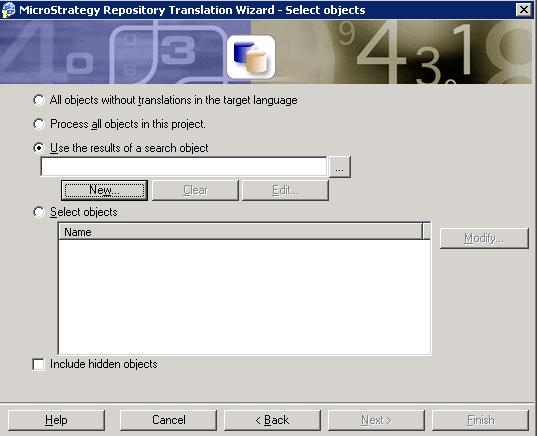
The Strategy Repository Translation Wizard 9.x and 10.x offers the ability to select one of the following four options for selecting objects to be exported to the Translation Table as shown below:
 

ka04W000000OefiQAC_0EM440000002E3a.jpeg


  • All objects without translations in the target language
  • Process all objects in this project
  • Use the results of a search object
  • Select objects

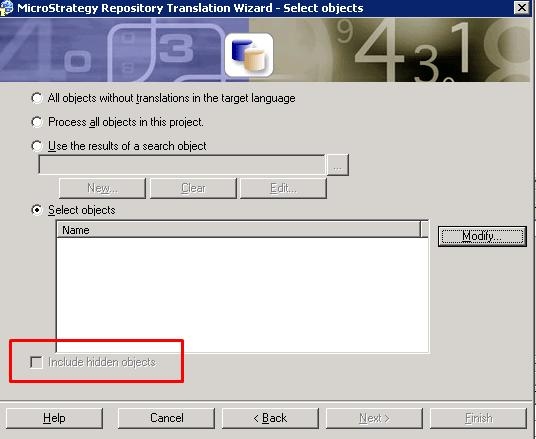
However, when "Select objects" option is chose, "Include hidden objects" becomes unavailable as shown below:
 

ka04W000000OefiQAC_0EM440000002E3Y.jpeg

 
CAUSE:
This is a known issue with Strategy Repository Translation Wizard 9.x and 10.x. 
ACTION:
Contact Strategy Technical Support for an update regarding the status of this issue.
 
WORKAROUND:
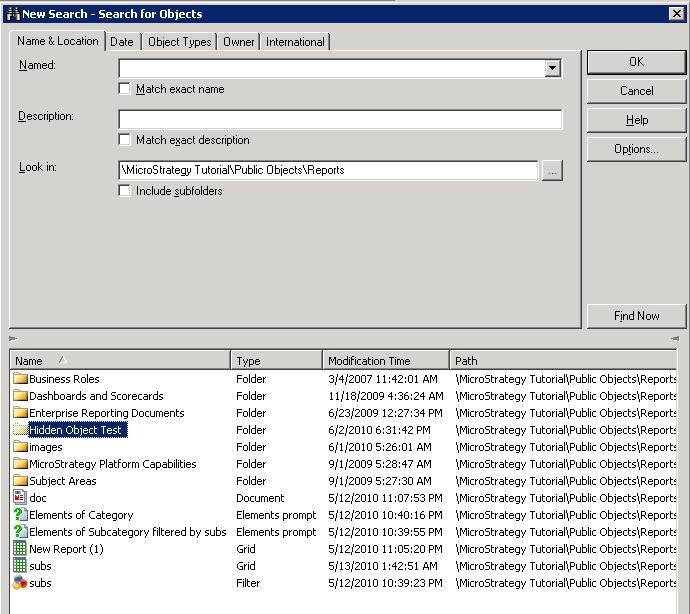
Select "Use the results of a search objects," and define a search object that returns hidden objects:
 

ka04W000000OefiQAC_0EM440000002E3c.jpeg

 
This way, hidden object names are also exported to Translation Table.


Comment

0 comments

Details

Knowledge Article

Published:

June 8, 2017

Last Updated:

June 8, 2017