EducationSoftwareStrategy.com
StrategyCommunity

Knowledge Base

Product

Community

Knowledge Base

TopicsBrowse ArticlesDeveloper Zone

Product

Download SoftwareProduct DocumentationSecurity Hub

Education

Tutorial VideosSolution GalleryEducation courses

Community

GuidelinesGrandmastersEvents
x_social-icon_white.svglinkedin_social-icon_white.svg
Strategy logoCommunity

© Strategy Inc. All Rights Reserved.

LegalTerms of UsePrivacy Policy
  1. Home
  2. Topics

KB33620: User DSNs in the ODBC Data Source Administrator does not appear in the drop down list of available Data Source Names to choose for Translation Table with MicroStrategy Repository Translation Wizard


Community Admin

• Strategy


User DSN does not appear in the drop down list of available DSNs for the Translation Table that can be defined with Repository Translation Wizard.

SYMPTOM:
User DSN does not appear in the drop down list of available DSNs for the Translation Table that can be defined with Repository Translation Wizard.
 
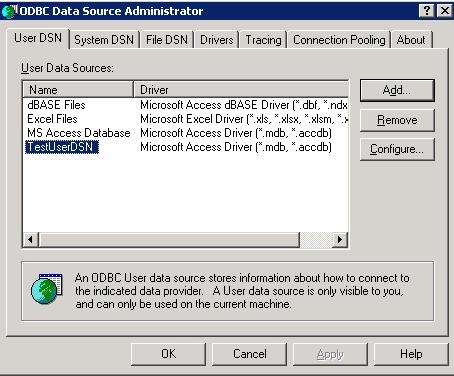
In the ODBC Data Source Administrator, User DSN, "TestUserDSN" can be seen as shown below:
 

ka04W000000OdWyQAK_0EM440000002HSM.jpeg

 
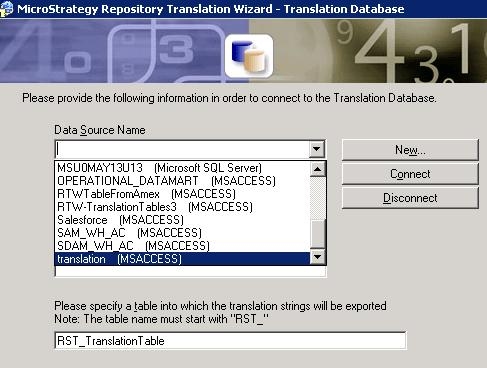
However in the Repository Translation Wizard, this DSN is not listed while all of the other System DSNs are available:
 

ka04W000000OdWyQAK_0EM440000002HSN.jpeg

 
CAUSE:
The Repository Translation Tool is working as designed. Since User DSNs are available only for the user login to the session, there is a high chance that the Service account or some other user account have problems connecting database with User DSN. Therefore, System DSN should be used. 
ACTION:
Use System DSN to avoid this issue.


Comment

0 comments

Details

Knowledge Article

Published:

April 8, 2017

Last Updated:

April 8, 2017