Users may want to add a custom link to the link bar in the Welcome Page as shown below:
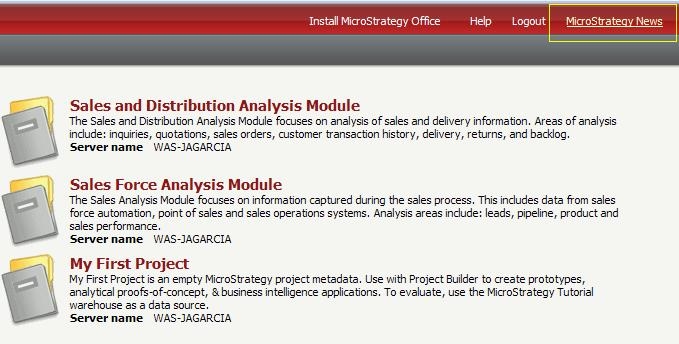
The following steps show how to accomplish this customization using the Strategy Web Customization Editor.
1.- Open the welcome page and go to the template properties tab.
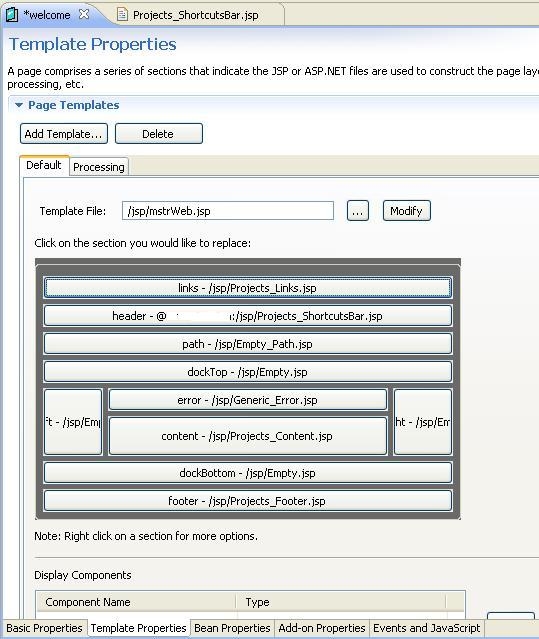
2.- Right click the Projects_ShortcutsBar.jsp and select edit file.
3.- Add the following lines containing your custom link:
Sample Code/Error
<span class="mstrShortcut"><a
href="http://www.MicroStrategy.com"
target="_blank"><web:descriptor
desc="Strategy News" /></a></span>
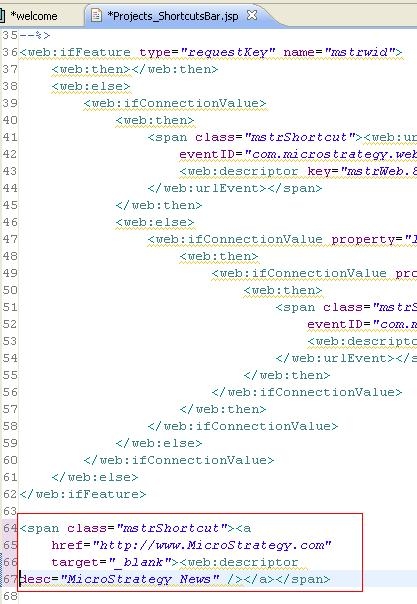
4.- Save and restart the web server to see your custom link.
Customization Code Warning:
This customization is provided as a convenience to Strategy users and is only directly applicable to the version stated. While this code may apply to other releases directly, Strategy Technical Support makes no guarantees that the code provided will apply to any future or previous builds. In the event of a code change in future builds, Strategy may not be able to provide additional code on this matter even though this customization is provided at this time for this specific build
