EducationSoftwareStrategy.com
StrategyCommunity

Knowledge Base

Product

Community

Knowledge Base

TopicsBrowse ArticlesDeveloper Zone

Product

Download SoftwareProduct DocumentationSecurity Hub

Education

Tutorial VideosSolution GalleryEducation courses

Community

GuidelinesGrandmastersEvents
x_social-icon_white.svglinkedin_social-icon_white.svg
Strategy logoCommunity

© Strategy Inc. All Rights Reserved.

LegalTerms of UsePrivacy Policy
  1. Home
  2. Topics

KB33629: Error "timeout during allocate / CPIC-CALL: ThSAPCMRCV" when executing a MDX report from SAP BW in MicroStrategy Developer 9.4.x-10.x


Stefan Zepeda

Salesforce Solutions Architect • Strategy


This knowledge base article explains why error "timeout during allocate / CPIC-CALL: ThSAPCMRCV" occurs when executing a MDX report from SAP BW in MicroStrategy Developer 9.4.x-10.x.

SYMPTOM:
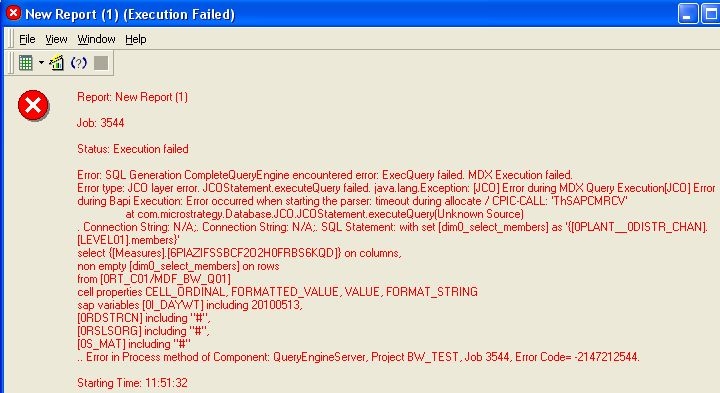
When executing MDX reports against SAP BW in Strategy Developer 9.4.x-10.x, the following error message is shown:
 

ka02R000000kcJnQAI_0EM440000002Aoh.jpeg


Report: New Report 
Job: 3483
Status: Execution failed 
Error: SQL Generation CompleteQueryEngine encountered error: ExecQuery failed. MDX Execution failed.
Error type: JCO layer error. JCOStatement.executeQuery failed. java.lang.Exception: Error during MDX Query Execution Error during Bapi Execution: Error occurred when starting the parser: timeout during allocate / CPIC-CALL: 'ThSAPCMRCV'
 at com.Strategy.Database.JCO.JCOStatement.executeQuery(Unknown Source)
. Connection String: N/A;. Connection String: N/A;. SQL Statement: with set as '{..members}'
select {.} on columns,
non empty on rows
from
cell properties CELL_ORDINAL, FORMATTED_VALUE, VALUE, FORMAT_STRING
sap variables including 20100513,
including "#",
including "#",
including "#"
.. Error in Process method of Component: QueryEngineServer, Project BW_TEST, Job 3483, Error Code= -2147212544.
 
Starting Time: 11:18:35 


CAUSE:
When executing MDX reports against SAP BW, a non-Unicode RFC library (librfc32.dll) is required to communicate with the SAP BW application server. If the non-Unicode RFC library is not implemented on the SAP BW application server, the error message above is returned.
 
ACTION:
Contact your SAP BW administrator to implement the latest version of librfc32.dll on all SAP BW application servers.
 
WARNING:
The third-party product(s) discussed in this technical note is manufactured by vendors independent of Strategy. Strategy makes no warranty, express, implied or otherwise, regarding this product, including its performance or reliability.


Comment

0 comments

Details

Knowledge Article

Published:

May 11, 2017

Last Updated:

May 11, 2017