Users may want to hide or avoid to be displayed the Intelligence Server Name when viewing the page source code in Strategy Web 9.x
After login into Strategy Web 9.x, if the users right click on the page to see the page source code, it is possible to see the Intelligence Server Name :
<!--"start:pageState"-->
<div id="report_dhtml_variables" iframe="true" name="report_dhtml_variables"><form id="pageStateForm" name="pageStateForm"><input name="Main.aspx" value="-.Strategy Tutorial.34953_" class="mstrHiddenInput" type="hidden"/><input name="desktop" value="*-1.*-1.0.0.0" class="mstrHiddenInput" type="hidden"/><input name="preferences" value="*-1.*-1.0.0.user.general...1." class="mstrHiddenInput" type="hidden"/></form><script language="javascript">pageState='Main.aspx=-.Strategy+Tutorial.34953_&desktop=*-1.*-1.0.0.0&preferences=*-1.*-1.0.0.user.general...1.';</script></div>
<!--"end:pageState"-->
In order to hide the Intelligence Server Name, users must uncheck the Strategy Web Admin setting:
URL: Session information is included on the URL.
Located under the Web Server Security settings.
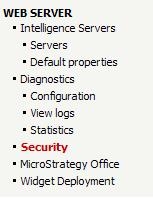

After saving the new setting, if the user right click to see the page source code he can not see the Intelligence Server name.
<!--"start:pageState"-->
<div id="report_dhtml_variables" iframe="true" name="report_dhtml_variables"><form id="pageStateForm" name="pageStateForm"><input name="desktop" value="*-1.*-1.0.0.0" class="mstrHiddenInput" type="hidden"/><input name="preferences" value="*-1.*-1.0.0.user.general...1." class="mstrHiddenInput" type="hidden"/></form><script language="javascript">pageState='desktop=*-1.*-1.0.0.0&preferences=*-1.*-1.0.0.user.general...1.';</script></div>
<!--"end:pageState"-->
